

Since planets now rotate, any chance of having a toggle for display of spherical coords(relative to planet) when in atmospheric piloting mode? Seems like it would be trivial to execute.
My only criticism so far of this great game is that navigation(both on and off planets) is cumbersome. Not the sexiest element in which to invest the effort, but it really needs to be addressed at some point.
Spherical coords planetside.
-
Marvin

- Global Moderator

- Posts: 14373
- Joined: Wed Mar 04, 2009 5:47 am
- Location: Fallon-Reno
Spherical coords planetside.
 Off-planet navigation is simple ... granted, it looks complicated here:
http://www.starwraith.com/forum/viewtop ... #pid150452
But, once you get used to it (which is a lot easier than learning real-life navigation), you'll find it less cumbersome than other astro-nav systems.
As for getting planetary coordinates, why not post a flow diagram or subroutine for how you'd do it? I'd be interested in your solution.-
Mr.Peanut
- Ensign

- Posts: 21
- Joined: Sat Mar 07, 2009 7:27 pm
Spherical coords planetside.
For in-space, it is the navigation interface I feel needs work, not the coordinate system. Zoom out, count grids, zoom in click over and up, oops counted wrong, zoom out count again zoom in, count and click...
Plus it would be nice to see coord info or be able to toggle it in the regular HUD.
As for planet-side.. cartesian to spherical coords is a standard transform. Subtract origin of planet from player position. Transform to spherical. Add/subtract planet rotation to player's longitude.
These are subjective nitpicks. I bought this game over a year ago and have finally invested enough time to get immersed and I am very happy to be here.
Plus it would be nice to see coord info or be able to toggle it in the regular HUD.
As for planet-side.. cartesian to spherical coords is a standard transform. Subtract origin of planet from player position. Transform to spherical. Add/subtract planet rotation to player's longitude.
These are subjective nitpicks. I bought this game over a year ago and have finally invested enough time to get immersed and I am very happy to be here.
-
Marvin
- Global Moderator
- Posts: 14373
- Joined: Wed Mar 04, 2009 5:47 am
- Location: Fallon-Reno
Spherical coords planetside.
From post: 160233, Topic: tid=10715, author=Mr.Peanut wrote:Plus it would be nice to see coord info or be able to toggle it in the regular HUD.
Try the Explorer Kit available at SeeJay's website. I've been using it for years.-
Vice

- Administrator

- Posts: 12227
- Joined: Fri Apr 25, 2003 1:38 am
Spherical coords planetside.
This sounds like you just may not yet be familiar with the nav console options available to you. You don't need to count grids, zoom, then click the arrows to move the map around. Simply zoom out, locate the sector you want to zoom in on, then -right- click on the sector you want to zoom in on. That will bring up the sector you select immediately, no toggling or counting required. Check out the tutorial videos ( http://www.starwraith.com/evochronmerce ... iverse.htm ) and instructions included with the game for more details on available nav options.For in-space, it is the navigation interface I feel needs work, not the coordinate system. Zoom out, count grids, zoom in click over and up, oops counted wrong, zoom out count again zoom in, count and click...
As Marvin points out, this option can be enabled via a simple text file mod. You can check out the customizing kit for more details on the options available, including placement on the HUD.Plus it would be nice to see coord info or be able to toggle it in the regular HUD.
-
Marvin
- Global Moderator
- Posts: 14373
- Joined: Wed Mar 04, 2009 5:47 am
- Location: Fallon-Reno
Spherical coords planetside.
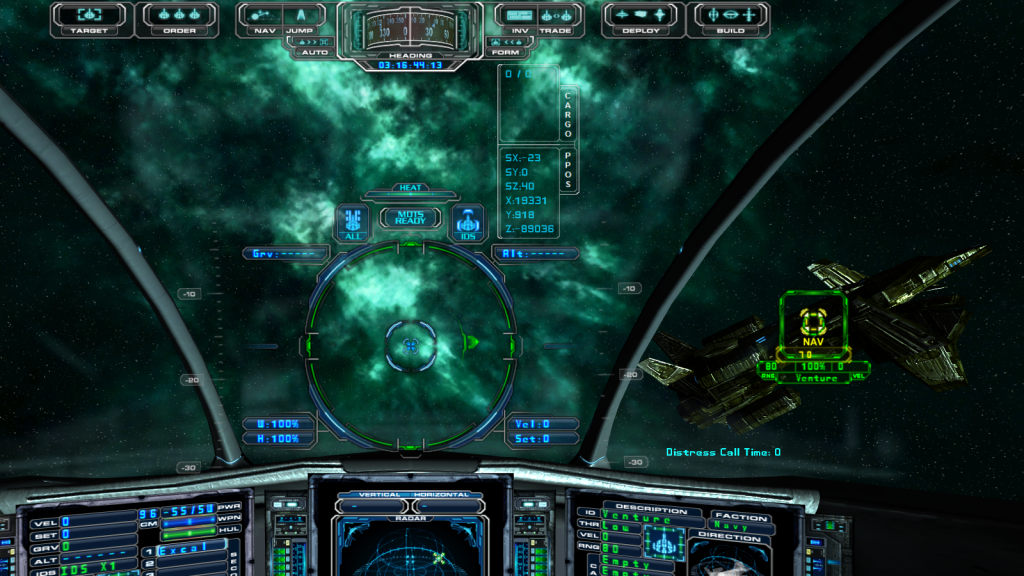
Here's a screenshot of the version I use ... the coordinates for my present position (PPOS) are displayed just below the upper HUD, right side ... and can be cycled on-off using the "H" key.From post: 160244, Topic: tid=10715, author=Vice wrote:As Marvin points out, this option can be enabled via a simple text file mod. You can check out the customizing kit for more details on the options available, including placement on the HUD.Plus it would be nice to see coord info or be able to toggle it in the regular HUD.
-
DaveK

- Global Moderator
- Posts: 4161
- Joined: Mon Apr 19, 2010 9:04 pm
- Location: Leeds UK
Spherical coords planetside.
Where is it? What is it called? What does it do?From post: 160238, Topic: tid=10715, author=Marvin wrote:[Try the Explorer Kit available at SeeJay's website. I've been using it for years.

(Is it EvoMetrics and MapLog?)
Callsign: Incoming

Life is like a sewer... what you get out of it depends on what you put into it. - Bob Newhart
Hell is being in a pure platinum asteroid field... with a diamond mining beam


Life is like a sewer... what you get out of it depends on what you put into it. - Bob Newhart
Hell is being in a pure platinum asteroid field... with a diamond mining beam
-
SeeJay

- Captain

- Posts: 3507
- Joined: Wed Aug 11, 2010 9:03 am
- Location: Sweden
Spherical coords planetside.
Here it is: http://www.evochron.junholt.se/menus/mods.htm (Marvin's Exploration Hud)From post: 160253, Topic: tid=10715, author=DaveK wrote:Where is it? What is it called? What does it do?From post: 160238, Topic: tid=10715, author=Marvin wrote:[Try the Explorer Kit available at SeeJay's website. I've been using it for years.
(Is it EvoMetrics and MapLog?)
\"Nothing is impossible, it only takes a bit longer!\"
\"We are not retreating, we are advancing in another direction!\"
http://evochron.junholt.se (Old)
http://www.evochron2.junholt.se (New)
http://mercenary.junholt.se (Map)
http://www.junholt.se/evoschool/index.htm (No spoilers)
-8- Bzzzzzzzzz! -8- -8-
\"We are not retreating, we are advancing in another direction!\"
http://evochron.junholt.se (Old)
http://www.evochron2.junholt.se (New)
http://mercenary.junholt.se (Map)
http://www.junholt.se/evoschool/index.htm (No spoilers)
-8- Bzzzzzzzzz! -8- -8-
-
DORN
- Lieutenant

- Posts: 284
- Joined: Sun Jan 01, 2012 6:27 pm
Spherical coords planetside.
Hi Marvin,
I am assuming that the PPOS data window position is determined buy the numbers in the hud.txt file?
If so, I would like to move that window to the right. Can you tell me which lines I need to change to move up. down, left, right.
You have some lovely features, there.
Thank you.
I am assuming that the PPOS data window position is determined buy the numbers in the hud.txt file?
If so, I would like to move that window to the right. Can you tell me which lines I need to change to move up. down, left, right.
You have some lovely features, there.
Thank you.
-
SeeJay
- Captain
- Posts: 3507
- Joined: Wed Aug 11, 2010 9:03 am
- Location: Sweden
Spherical coords planetside.
This is from the Customizing Kit:
Optional text colors and global HUD font (also uses the \\hud folder):
hudtext.dat = 1st value enables or disables the center text, 0 = disable, 1 = enable
2nd value is red color (0-255), 3rd is for green, 4th is for blue
5th line selects which font style to use, 0 for bold (default), 1 for thin
6th line activates cargo information, 0 = disable, 1 = enable
7th line sets the X position of the cargo text (0-1023)
8th line sets the Y position of the cargo text (0-1023)
9th line activates location information, 0 = disable, 1 = enable
10th line sets the X position of the location text (0-1023)
11th line sets the Y position of the location text (0-1023)
12th line activates and sets the spacing size of the numerical shield indicators
13th line sets the X position of the numerical shield indicators
14th line sets the Y position of the numerical shield indicators
Might be what you need!
Optional text colors and global HUD font (also uses the \\hud folder):
hudtext.dat = 1st value enables or disables the center text, 0 = disable, 1 = enable
2nd value is red color (0-255), 3rd is for green, 4th is for blue
5th line selects which font style to use, 0 for bold (default), 1 for thin
6th line activates cargo information, 0 = disable, 1 = enable
7th line sets the X position of the cargo text (0-1023)
8th line sets the Y position of the cargo text (0-1023)
9th line activates location information, 0 = disable, 1 = enable
10th line sets the X position of the location text (0-1023)
11th line sets the Y position of the location text (0-1023)
12th line activates and sets the spacing size of the numerical shield indicators
13th line sets the X position of the numerical shield indicators
14th line sets the Y position of the numerical shield indicators
Might be what you need!
\"Nothing is impossible, it only takes a bit longer!\"
\"We are not retreating, we are advancing in another direction!\"
http://evochron.junholt.se (Old)
http://www.evochron2.junholt.se (New)
http://mercenary.junholt.se (Map)
http://www.junholt.se/evoschool/index.htm (No spoilers)
-8- Bzzzzzzzzz! -8- -8-
\"We are not retreating, we are advancing in another direction!\"
http://evochron.junholt.se (Old)
http://www.evochron2.junholt.se (New)
http://mercenary.junholt.se (Map)
http://www.junholt.se/evoschool/index.htm (No spoilers)
-8- Bzzzzzzzzz! -8- -8-
-
DaveK
- Global Moderator
- Posts: 4161
- Joined: Mon Apr 19, 2010 9:04 pm
- Location: Leeds UK
Spherical coords planetside.
Thanks - I don't know how I missed it!!From post: 160254, Topic: tid=10715, author=SeeJay wrote: Here it is: http://www.evochron.junholt.se/menus/mods.htm (Marvin's Exploration Hud)
Thanks to Marvin for creating it
Callsign: Incoming
Life is like a sewer... what you get out of it depends on what you put into it. - Bob Newhart
Hell is being in a pure platinum asteroid field... with a diamond mining beam
Life is like a sewer... what you get out of it depends on what you put into it. - Bob Newhart
Hell is being in a pure platinum asteroid field... with a diamond mining beam
-
DORN
- Lieutenant
- Posts: 284
- Joined: Sun Jan 01, 2012 6:27 pm
Spherical coords planetside.
Thanks Marvin for demystifying that.
I saw it in the kit but didn't connect it with the cargo/PPOS.
Will do some experimenting, now.
Is there a right placement limitation issue/constraint same as the chat text left limit?
I saw it in the kit but didn't connect it with the cargo/PPOS.
Will do some experimenting, now.
Is there a right placement limitation issue/constraint same as the chat text left limit?
-
Marvin
- Global Moderator
- Posts: 14373
- Joined: Wed Mar 04, 2009 5:47 am
- Location: Fallon-Reno
Spherical coords planetside.
The placement I used is to avoid overlap with other displays in the game. Any further right and it overlaps Deploy and Build options. Any further down and it overlaps the timer countdown. If it was on the left side, it would overlap Chat and/or other messages.
If you do move the text, do not use the HUD graphic mod which puts a box over the text ... it's part of the .png and cannot be moved in the same way as the text. If you like, you can cut and paste from the graphic to re-center the boxes over the text after you move the text to a new location. Your decision.
If you do move the text, do not use the HUD graphic mod which puts a box over the text ... it's part of the .png and cannot be moved in the same way as the text. If you like, you can cut and paste from the graphic to re-center the boxes over the text after you move the text to a new location. Your decision.