New Frames & Inventory Console Features

Tips, tactics, and general discussion for Evochron Legacy.
User avatar
SeeJay
Captain
Captain
Posts: 3507
Joined: Wed Aug 11, 2010 9:03 am
Location: Sweden

New Frames & Inventory Console Features

Post by SeeJay »

From post: 157820, Topic: tid=9376, author=Zach wrote:That's good to hear. If you would like me to proof/edit anything let me know.

I will start checking in how to play custom quests, etc.. That won't mess up multiplayer will it? Speaking of which.. are there any components that would allow people to team up during the Quest / Story? That might be fun (like a Pick up group, not required, but anyone can join up for a while if they wanted).
Thanks for the offer.

At this time I have some Beta testers but I will take you up on
your offer depending on how many of them that reports in.

There are no way of forcing pilots to join forces in the script,
but I try to make some contracts as hard as possible so it will
be difficult to do them yourself.

Some systems are more hostile than others and I like scripting
stuff in those;)

\"Nothing is impossible, it only takes a bit longer!\"
\"We are not retreating, we are advancing in another direction!\"


http://evochron.junholt.se (Old)
http://www.evochron2.junholt.se (New)
http://mercenary.junholt.se (Map)
http://www.junholt.se/evoschool/index.htm (No spoilers)
-8- Bzzzzzzzzz! -8- -8-
Image
Zach
Lieutenant Jr. Grade
Posts: 80
Joined: Mon Mar 17, 2008 12:46 am

New Frames & Inventory Console Features

Post by Zach »

Been doing some thinking.

I would love to see more functional / interactivity with the cockpit displays. Maybe some stuff like pressable buttons, or easy-to-glance at information such as target Hull Integrity and Shield Status. (did I miss those?).

I think it would be nice to be able to target stations, asteroids, and other objects as well to see some basic information on them (size, range) and maybe an active scanning system where you can ping a certain radius out from your ship, and get return sensor data for helping to find things like items (would help with the lost items quests?)

I also think it would be nice to see an interactive Nav console, or at least an information readout console. I know there is the static Quadrant Map in cockpit type 2, but I mean either adding a screen, or using the existing Target screen as a new cycle option. Maybe even 2 screens (one for in sector position, and one for quadrant). Having it update in real time with position tracking, and also maybe showing other things such as waypoints, stations, etc.

It's not meant to replace the big screen Nav console, but just be a good quick reference guide.

I think there is also room on the top of the HUD to make modifications. It would be nice to have a digital readout for compass heading (we're in the future right?) and maybe pitch as well. I think there would also be room to have digital readouts for Sector X/Y/Z position, for use as a quick reference.
User avatar
Marvin
Global Moderator
Global Moderator
Posts: 14373
Joined: Wed Mar 04, 2009 5:47 am
Location: Fallon-Reno

New Frames & Inventory Console Features

Post by Marvin »

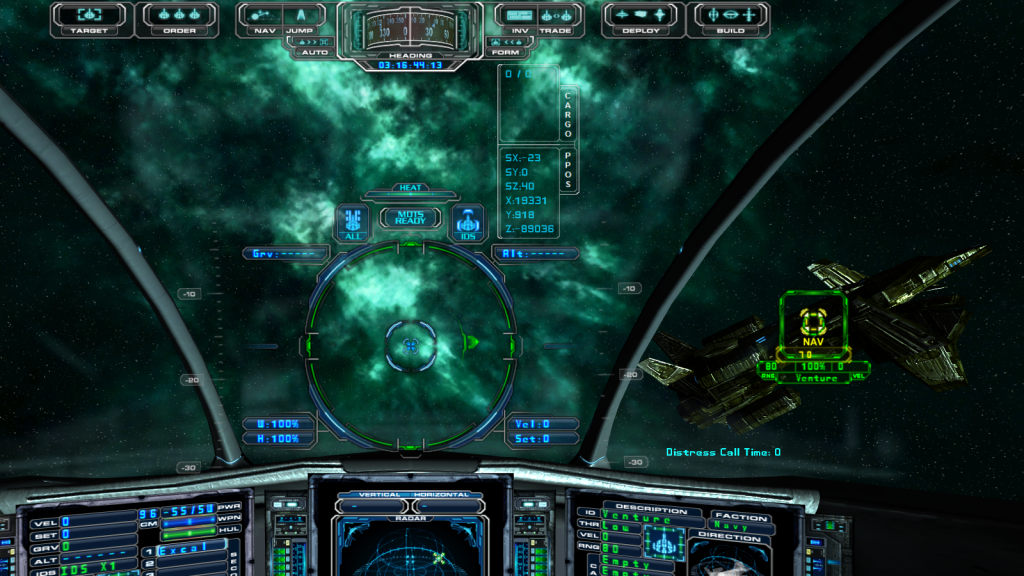
For that last idea, check the right side of the HUD in this screenshot from the H2GE:

Image

Some of the other things mentioned also already exist, either in the game proper or as a mod.
49rTbird
Captain
Captain
Posts: 2954
Joined: Sun Oct 28, 2007 10:57 pm
Location: Pinole,Ca,USA,Earth,Orion Spur,Milkyway, Etc.

New Frames & Inventory Console Features

Post by 49rTbird »

Marv, is the "CARGO PODS" rectangle to the right of the compass area a mode?:o
Explore! Explore! Explore! \"There is no going back (Yet) so Make Today Count!
User avatar
Marvin
Global Moderator
Global Moderator
Posts: 14373
Joined: Wed Mar 04, 2009 5:47 am
Location: Fallon-Reno

New Frames & Inventory Console Features

Post by Marvin »

From post: 157885, Topic: tid=9376, author=thetiebers wrote:Marv, is the "CARGO PODS" rectangle to the right of the compass area a mode?:o
:cool: Yup, I had to add the boxes around the PPOS and Cargo to one of the HUD graphics ... the readouts are part of one of Vice's text file options.
Zach
Lieutenant Jr. Grade
Posts: 80
Joined: Mon Mar 17, 2008 12:46 am

New Frames & Inventory Console Features

Post by Zach »

I'm aware of the pitch indicators on the HUD, but what I was getting at was when you want to get your bearings or quickly adjust your heading, should you really have to look in several difference places + open a screen that blocks your field of view to confirm other things?

And yes, I have been looking at HUD mods and some other stuff, but I am not ready to mess with that yet.. Anyway, because something is a MOD already shouldn't preclude it from becoming a standard feature, that seems ... wasteful of potentially great ideas everyone can benefit from without having to know about MODs and how to get them installed/working (and heaven forbid a game update break an abandoned MOD)
49rTbird
Captain
Captain
Posts: 2954
Joined: Sun Oct 28, 2007 10:57 pm
Location: Pinole,Ca,USA,Earth,Orion Spur,Milkyway, Etc.

New Frames & Inventory Console Features

Post by 49rTbird »

From post: 157887, Topic: tid=9376, author=Marvin wrote:
From post: 157885, Topic: tid=9376, author=thetiebers wrote:Marv, is the "CARGO PODS" rectangle to the right of the compass area a mode?:o
:cool: Yup, I had to add the boxes around the PPOS and Cargo to one of the HUD graphics ... the readouts are part of one of Vice's text file options.
My bad eyes saw PODS not PPOS :D:P so NOW I understand.:P:P:D:D:P:P
Explore! Explore! Explore! \"There is no going back (Yet) so Make Today Count!
hank
Lieutenant
Lieutenant
Posts: 179
Joined: Sun Aug 19, 2012 10:58 pm

New Frames & Inventory Console Features

Post by hank »

Can those coords readouts be shoved all the way to the right edge of the screen?

... like we've (I've) discovered I could do with the chat box (to the left edge)?

Seems like there was another mod that put them in the middle of the screen ... I didn't like that one cause it covered up too much going on in front of U.
Call sign: Thanatos
User avatar
Marvin
Global Moderator
Global Moderator
Posts: 14373
Joined: Wed Mar 04, 2009 5:47 am
Location: Fallon-Reno

New Frames & Inventory Console Features

Post by Marvin »

Those coordinates can be put anywhere on the screen. Check the ReadMe in the Customizing Kit for instructions. As for mods, they have been a part of computer games since ... well, almost since Roy Rogers stuffed Trigger. They are modifications (as opposed to part of the original game) because not everyone wants to use them.
hank
Lieutenant
Lieutenant
Posts: 179
Joined: Sun Aug 19, 2012 10:58 pm

New Frames & Inventory Console Features

Post by hank »

You answered my question. I can investigate how to move it to the right. I didn't know if it was possible.
Thanks and have a nice day.

best regards
hank
Call sign: Thanatos
hank
Lieutenant
Lieutenant
Posts: 179
Joined: Sun Aug 19, 2012 10:58 pm

New Frames & Inventory Console Features

Post by hank »

I'm having problems finding Vice's text file options and the HG2E you refer to:

"... Yup, I had to add the boxes around the PPOS and Cargo to one of the HUD graphics ... the readouts are part of one of Vice's text file options. ... "

I could not find anything on SeaJay's site unless I downloaded every HUD mod and looked.

However, that is a very nice addition. I don't use full mods ... only parts because I've had issues with full cockpit mods in the past. This is one I'd like to add. Actually the only mods I use is a strafe symbol I can see against black and white and the map mod for econ and tech stuff.

Hope all is well.
Call sign: Thanatos
User avatar
Marvin
Global Moderator
Global Moderator
Posts: 14373
Joined: Wed Mar 04, 2009 5:47 am
Location: Fallon-Reno

New Frames & Inventory Console Features

Post by Marvin »

Unfortunately, the Explorer Kit is too big to post at the forum. And the biggest part is the HUD graphic (about 76kb). The box mod would need to be moved, anyway, if you wanted the readout in a different location. The following file, placed in your hud folder, will add the data to the same place as shown in the screenshot ... but it won't add the boxes.

[file]736[/file]
hank
Lieutenant
Lieutenant
Posts: 179
Joined: Sun Aug 19, 2012 10:58 pm

New Frames & Inventory Console Features

Post by hank »

I played around with the hudtext.dat file and found out that these values pushed the cargo and coords text fairly near the right edge of a wide screen monitor.

1
0
200
255
0
1
608
34
1
608
103

the "608" number is what pushed the text right. ... don't know much about the other numbers ... you can vary that number from what Marvin's download has in it to your preference.

I have no idea what the top few numbers mean except that its "code" for what you have in your cargo bays. I'm more interested in the Sx, Sy, Sz... etc. number for my position. Since i found out how to get it out of my field of view through the HUD, I'm happy and I'm going to leave it as is.

FWIW
In the chattext.dat file the "-7.5" pushes that chat text box left ... thus:

100
255
255
20
50
-7.5
0

both these files go in the HUD folder in the main EM directory.

enjoy


[Edited on 2-5-2013 by hank]
Call sign: Thanatos
User avatar
Marvin
Global Moderator
Global Moderator
Posts: 14373
Joined: Wed Mar 04, 2009 5:47 am
Location: Fallon-Reno

New Frames & Inventory Console Features

Post by Marvin »

:cool: From the Customizing Kit ReadMe:
Optional text colors and global HUD font (also uses the \\hud folder):

hudtext.dat = 1st value enables or disables the center text, 0 = disable, 1 = enable
2nd value is red color (0-255), 3rd is for green, 4th is for blue
5th line selects which font style to use, 0 for bold (default), 1 for thin
6th line activates cargo information, 0 = disable, 1 = enable
7th line sets the X position of the cargo text (0-1023)
8th line sets the Y position of the cargo text (0-1023)
9th line activates location information, 0 = disable, 1 = enable
10th line sets the X position of the location text (0-1023)
11th line sets the Y position of the location text (0-1023)
12th line activates and sets the spacing size of the numerical shield indicators
13th line sets the X position of the numerical shield indicators
14th line sets the Y position of the numerical shield indicators
hank
Lieutenant
Lieutenant
Posts: 179
Joined: Sun Aug 19, 2012 10:58 pm

New Frames & Inventory Console Features

Post by hank »

I must thank you again Marvin for you patience with a lazy user. I finally cracked open that readme and skimmed it. Before I post more stuff like this, I'll read it more thoroughly.

that is good stuff ... plus I see there is even more good stuff in that readme

have a nice day
Call sign: Thanatos
Hour Hero Yes
Ensign
Ensign
Posts: 13
Joined: Mon Jan 28, 2013 6:24 pm

New Frames & Inventory Console Features

Post by Hour Hero Yes »

I'd like to see more planet easter eggs, like uncharted cities, shipwrecks, maybe even caverns??? We had a group of 6 or so combing Andromeda for secrets and it was a ton of fun.
AMATEUR EXPLORER
2nd Wingman of [UE] 1st Fighter Squadron
DISCOVERIES
STARS: 17
PLANETS: 42
Image
Letoras
Lieutenant
Lieutenant
Posts: 317
Joined: Thu Jan 19, 2012 11:15 pm
Location: Greece

New Frames & Inventory Console Features

Post by Letoras »

I would like to have the ability to tell the auto pilot when he "gets" a planet or a station at the radar to stop jumping and wait for further instructions....
Surf Solar.
User avatar
Marvin
Global Moderator
Global Moderator
Posts: 14373
Joined: Wed Mar 04, 2009 5:47 am
Location: Fallon-Reno

New Frames & Inventory Console Features

Post by Marvin »

From post: 158559, Topic: tid=9376, author=Letoras wrote:I would like to have the ability to tell the auto pilot when he "gets" a planet or a station at the radar to stop jumping and wait for further instructions....
I assume you mean a new planet. It would get kind of frustrating if, while cruising through Sapphire, your ship abruptly halts at every planet. Btw, Atollski's program does provide a warning when you're getting near an uncharted planet. But it won't halt your ship.
stch
Ensign
Ensign
Posts: 37
Joined: Sat Feb 11, 2012 2:27 am

New Frames & Inventory Console Features

Post by stch »

possibility to "clan link" with a neutral pilot
Letoras
Lieutenant
Lieutenant
Posts: 317
Joined: Thu Jan 19, 2012 11:15 pm
Location: Greece

New Frames & Inventory Console Features

Post by Letoras »

From post: 158569, Topic: tid=9376, author=Marvin wrote:
From post: 158559, Topic: tid=9376, author=Letoras wrote:I would like to have the ability to tell the auto pilot when he "gets" a planet or a station at the radar to stop jumping and wait for further instructions....
I assume you mean a new planet. It would get kind of frustrating if, while cruising through Sapphire, your ship abruptly halts at every planet. Btw, Atollski's program does provide a warning when you're getting near an uncharted planet. But it won't halt your ship.
Yes you assume correct. I tried Atollski's software but it keeps on crashing at the start. I am trying to figure out how the em_tool woks.
Surf Solar.
User avatar
Cargo
Lieutenant
Lieutenant
Posts: 205
Joined: Tue Jun 28, 2011 1:38 am
Location: Southeastern Quadrant, All Servers

New Frames & Inventory Console Features

Post by Cargo »

[rrquote=135399&tid=9376&author=Cargo
posted on 4-19-2012 at 12:53 PM]Gravitational Pull and the ability to orbit would be cool.
[/rrquote]

Seeing how this has been my only suggestion in this list and it's about to come to fruition, I thought I'd add another possibly easier one.

Headlights for the Terrain Walkers would make dark side planet walks alot more enjoyable.

---
The major difference between a thing that might go wrong and a thing that cannot possibly go wrong is that when a thing that cannot possibly go wrong goes wrong it usually turns out to be impossible to get at or repair.
Jk-77
Ensign
Ensign
Posts: 33
Joined: Mon Jan 28, 2013 10:46 pm

New Frames & Inventory Console Features

Post by Jk-77 »

Yeah similar to what Cargo posted, i would like toggable headlights for the Ships and Terrain Walkers, and maybe even some planetary caves that you can explore for hidden loot that could be located on mountainsides or other locations, the entrances could be too small for spacecraft so Terrain Walkers would be essential in exploring them, would make exploring planets a little more fun/interesting and adding more TW contract possibilities. Deep in the caves there might be high interference or something that reduces the range of your radar and makes you invisible to other ships looking for you on thier radars so you could hide on the planet if you wanted to escape detection and there is no nebula in the immediate area. The caves would be dark so would heighten the need for headlights.

Some amount of Terrain Walker customisation might be an idea, e.g swap out different kinds of cannons maybe even purchase certain hardpoints for the TW, e.g a faster movement device, higher shield reserves etc. Even some planetary combat missions, staged inside the atmoshphere, where you could use your TW for combat which would add to the combat possibilities in the game. I think more varied and detailed scenery would be a good addition too, some scenery could have an effect on the Terrain Walkers, for example, walking in a heavily grassy area would slow the TW and make it less noisy etc.

I appologise if some of these ideas have already been posted, its a long thread lol :)

*TW=Terrain Walker

[Edited on 21-2-2013 by Jk-77]
User avatar
DaveK
Global Moderator
Global Moderator
Posts: 4161
Joined: Mon Apr 19, 2010 9:04 pm
Location: Leeds UK

New Frames & Inventory Console Features

Post by DaveK »

From post: 157917, Topic: tid=9376, author=Zach wrote:Anyway, because something is a MOD already shouldn't preclude it from becoming a standard feature, that seems ... wasteful of potentially great ideas everyone can benefit from without having to know about MODs and how to get them installed/working (and heaven forbid a game update break an abandoned MOD)
The Expansion cockpit was originally a mod that got rave reviews. The problem with the "potentially great ideas everyone can benefit from without having to know about MODs" is that your "ideal addition" to the HUD could be my idea of "clutter". There are a number of HUD mods out there that are soooo minimal you can sometimes think the HUD has been switched off! :D

Is it that unreasonable to have to trade off the ability to mix and match HUD options to create your ideal HUD for a tiny bit of learning about popping the relevant graphic files into a folder called HUD and putting that folder into the main game folder?

:)
Callsign: Incoming
Image
Life is like a sewer... what you get out of it depends on what you put into it. - Bob Newhart
Hell is being in a pure platinum asteroid field... with a diamond mining beam
ImageImage
Letoras
Lieutenant
Lieutenant
Posts: 317
Joined: Thu Jan 19, 2012 11:15 pm
Location: Greece

New Frames & Inventory Console Features

Post by Letoras »

Is it possible to have different light colors in the universe?
Blue for Pearl, red for Talison, etc.
It would more interesting in the eye.
Surf Solar.
-splosives-
Captain
Captain
Posts: 1017
Joined: Sun Feb 12, 2012 10:56 pm

New Frames & Inventory Console Features

Post by -splosives- »

I think they already are slightly colored.
Image
SplosivesCorp: Bringing people closer to destruction.