Multiplayer issue

For help with SW3DG game related technical issues.
nemafow
Ensign
Ensign
Posts: 12
Joined: Fri Jan 20, 2012 1:13 am

Multiplayer issue

Post by nemafow »

Hi,

Me and a few friends got Evochron Mercenary recently and have been having fun playing on a play at the same time as host multiplayer game.

I decided that I would make a permanent private dedicated server last night but I ran into some issues I would like some assistance on! We are all Australians so the option could be for other aussies to play as well (if my connection can handle it :P) if my problem is worked out!


Essentially, I have two computers, Computer A and Computer B.

Computer A is my main desktop and runs a steam version of Evochron Mercenary

Computer B is my 'server' and runs a 2D dedicated version of Evochron Mercenary

Both computer A and B run Windows 7 (B used to be dedicated to Ubuntu but thats another story!)

Both are easily able to run the game, but computer B does not have 3D capability, so runs the dedicated server software in 2D mode.


Computer A and B are on the same local network, connected to the same router and use the same internet.

Computer A and B can talk to each other on the local network with no problems and I have never had the issue I will discuss below in hosting any other dedicated server games.

I aim to run this dedicated server so my friends (who are using their own computers/internet) can connect over the internet using direct IP. But Computer A also needs to connect to this dedicated server.

Port forwarding has been setup to point to the server's IP address.


Okay now with the basics out of the way, the problem I'm having!


I am running the newest version of the dedicated server and have modified the .dat file with the relevant settings. This has allowed the first friend to connect using my internet IP (while we were testing).

The problem I'm experiencing is, Computer A cannot connect to this dedicated server when I try to connect to my 'internet ip' it says either full or no game on this IP - but has no problems connecting to its local IP address.

If a friend is connected to the server over the internet and I try to connect to the local IP address of the server, it will 'connect' and crash the program (loses responsiveness and will freeze) - understandable, only game I can think of that I have hosted that will allow both internet and LAN players at the same time is Minecraft.


I have tried unsuccessfully using Hamachi to 'trick' both A and B into thinking all the players are local to get around the either internet players or LAN players, not both situation, but hamachi didnt work.


So my question to you all brilliant fine people is, how can I get Computer A, to connect to its 'own' internet IP and join Computer B's dedicated server game? (as obviously both Computer A and B share the same internet IP, as using the same internet) or alternatively, how can I allow the dedicated server game to allow both local AND internet players at the same time.

Games such as Arma II, allowed me to connect Computer A to Computer B over the internet, so I have a feeling its something dependent to the game, or there is something funky with the port forwarding requirements, although you mention there is only the 2 that need to be forwarded.

Is it possible to nominate a port when joining a server? I have had problems in the past where including the port number (ie connect 200.30.40.123:1234 has let a client connect) where as trying the IP address without the port, did not work.


Thoughts?


Alex
Dingo
Commander
Commander
Posts: 967
Joined: Sun Oct 17, 2010 12:32 am
Location: Is everything

Multiplayer issue

Post by Dingo »

That is quite longer than the u2u version :D
Life is an illusion. Only shooting red things is real.
nemafow
Ensign
Ensign
Posts: 12
Joined: Fri Jan 20, 2012 1:13 am

Multiplayer issue

Post by nemafow »

Haha, yes it is, I tried to get the information across in a smaller one (as I didnt have another 30 mins to type it out!), but I knew I wouldnt do the explanation justice!
User avatar
Vice
Administrator
Administrator
Posts: 12227
Joined: Fri Apr 25, 2003 1:38 am

Multiplayer issue

Post by Vice »

You should actually be able to sign in via the local LAN IP of computer B while other players outside of your network can connect over the internet. It's possible something is not working correctly with the 2D version of the program. Is there any way to enable even basic 3D on computer B to test with the other program? I'd be interested in learning if it works while the other doesn't. The 2D program (still technically being tested) is brand new and written in a different development language that may have pending issues remaining with the multiplayer module. So trying the 3D program would help determine if that may be the case when trying to use the 2D program in that way.
StarWraith 3D Games
www.starwraith.com | www.spacecombat.org
3D Space Flight and Combat Simulations
nemafow
Ensign
Ensign
Posts: 12
Joined: Fri Jan 20, 2012 1:13 am

Multiplayer issue

Post by nemafow »

Hi Vice,

Appreciate your assistance, fantastic game btw!

I'll have a fiddle with it tonight and see if I can get 3D working on Computer B, worst case I have another 50 PCs in my house to choose from which half will have 3D capability, I just like Computer B because its low power consumption for leaving on 24/7. But pointing that out has given me something to work with, so appreciate that - will keep you posted!
nemafow
Ensign
Ensign
Posts: 12
Joined: Fri Jan 20, 2012 1:13 am

Multiplayer issue

Post by nemafow »

Ah vice, you were right!

Ran it in 3D mode (on another PC because it was quicker to setup) and it worked first try, I can connect locally or to my 'internet ip'. So as you expected, there may be a bug in the 2D version. Appreciate your help!
MiaZ
Lieutenant
Lieutenant
Posts: 404
Joined: Sat Jul 11, 2009 11:13 am
Location: Sx-3500, Sy 0, Sz,3500

Multiplayer issue

Post by MiaZ »

From post: 124500, Topic: tid=8404, author=nemafow wrote: We are all Australians so the option could be for other aussies to play as well (if my connection can handle it :P) if my problem is worked out!

My high ping has never been a problem for me with this game but
if you do decide to open it up for other aussies, it would be nice to have an Australian server to play on : )


[Edited on 1-20-2012 by MiaZ]
User avatar
Vice
Administrator
Administrator
Posts: 12227
Joined: Fri Apr 25, 2003 1:38 am

Multiplayer issue

Post by Vice »

For those running into problems with the 2D version of the program, please try temporarily setting the CPU affinity to one core, then test for changes. Please verify that your port settings are correct to make sure any connection problems are just configuration related.

Also, I have put together a revised build of the 2D program that supports a number of custom display, font, and rendering mode options. One or more of which may help the program to render/perform as needed on your system. The updated version can be download here:

http://www.starwraith.com/evochronmerce ... rver2D.zip

Extract the files and replace the old EXE file with the one in the zip file. Also make sure to include the screenmode.txt file in the same folder, which is a new addition. Now to test the different options, here is what each line in this file represents:

Line 1 = Screen Width Resolution (1024 recommended)
Line 2 = Screen Height Resolution (768 recommended)
Line 3 = Color Depth Setting (16 recommended)
Line 4 = Screen Mode Settings (1 = windowed/preferred, 2 = full screen)
Line 5 = Font Name (lets you select a different font that is present on your system)
Line 6 = Font Size (14-18 generally good for many fonts)
Line 7 = Font Rendering Format (-1 for True Type, 2 for Bitmap, 3 for FX Bitmap, 8 = Compressed Raster Font)

In particular, try a value of 8 in line 7.

So with these options, see if you can apply settings that will work on your system, then please let me know what they are. Hopefully, this will lead to a solution and I can integrate it into the next update for the program.

[Edited on 1-20-2012 by Vice]
StarWraith 3D Games
www.starwraith.com | www.spacecombat.org
3D Space Flight and Combat Simulations
User avatar
DaveK
Global Moderator
Global Moderator
Posts: 4161
Joined: Mon Apr 19, 2010 9:04 pm
Location: Leeds UK

Multiplayer issue

Post by DaveK »

wow - this i like meeting a new alien people for the first time and waiting for the universal translator to catch up! Anyway - welcome to the game and I hope you join in with the "normal" MP sometime :)
Callsign: Incoming
Image
Life is like a sewer... what you get out of it depends on what you put into it. - Bob Newhart
Hell is being in a pure platinum asteroid field... with a diamond mining beam
ImageImage
Maarschalk
Captain
Captain
Posts: 7641
Joined: Wed Feb 25, 2009 12:24 am
Location: USA, Also check your six!

Multiplayer issue

Post by Maarschalk »

Hi Nemafow, welcome to the game and forum. Hope to see you out there some time!....;):cool:
Arvoch Alliance Stat:


Evochron Legends Stats:


Evochron Mercenary Stats:


Darkness is the absence of Light as Evil is the absence of Good
kais58
Ensign
Ensign
Posts: 8
Joined: Thu Jan 19, 2012 7:16 pm

Multiplayer issue

Post by kais58 »

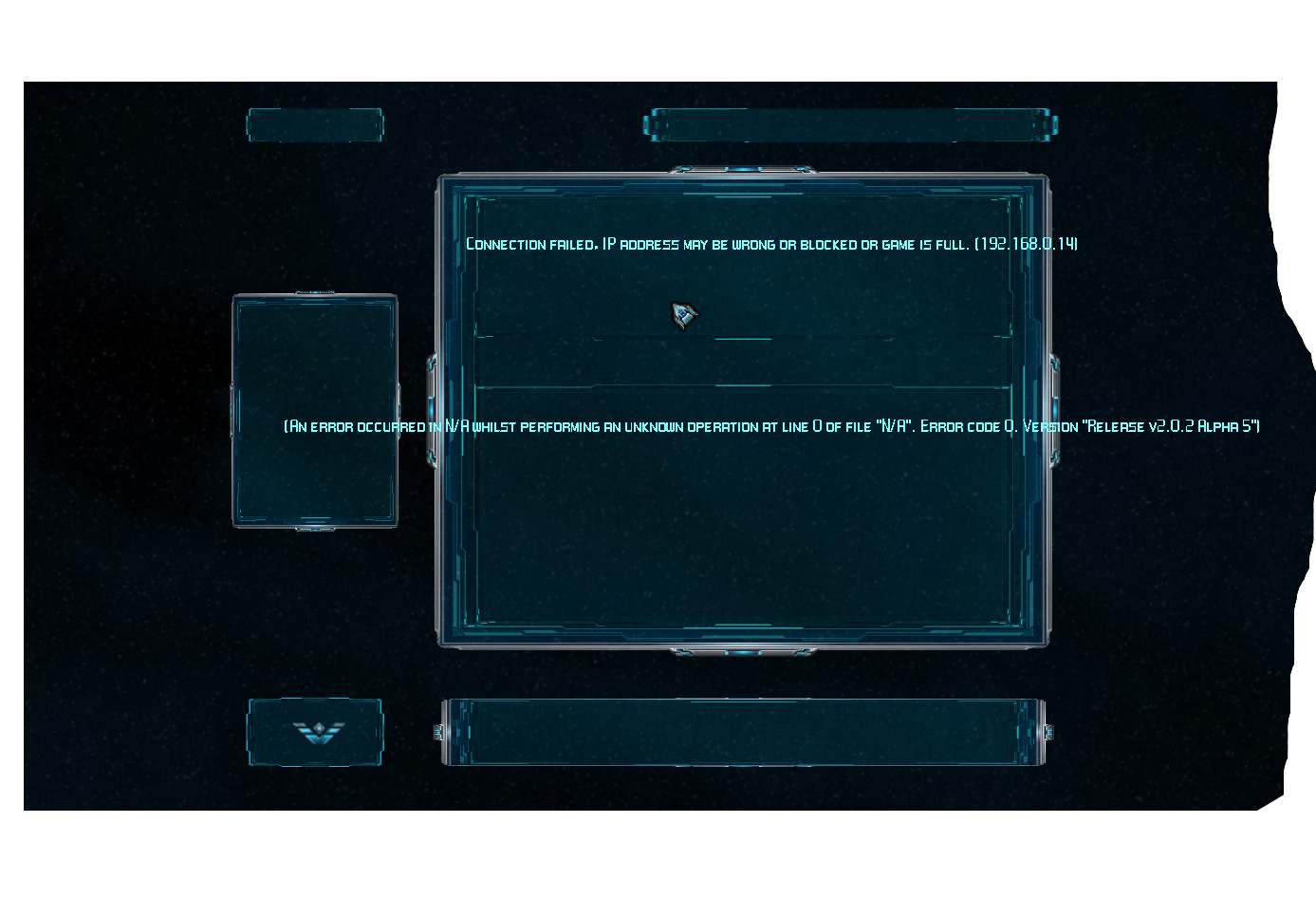
Just tried out the new 2D server versions, looks much nicer but still having this issue: https://sucs.org/~kais58/evo.jpg when I try to connect, is this a server config issue? I'm not sure as it gets a different error when there is no server there.
Jest
Ensign
Ensign
Posts: 13
Joined: Sat Oct 02, 2010 3:49 pm

Multiplayer issue

Post by Jest »

I had the same issue Kais58, try setting the server to private mode, then directly connecting to the server via join IP.
kais58
Ensign
Ensign
Posts: 8
Joined: Thu Jan 19, 2012 7:16 pm

Multiplayer issue

Post by kais58 »

hmm, maybe this is a networking issue on my part...
nemafow
Ensign
Ensign
Posts: 12
Joined: Fri Jan 20, 2012 1:13 am

Multiplayer issue

Post by nemafow »

Thank you for the kind words guys ;)

More than welcome to play Miaz! I doubt there will be as much traffic on mine when its up and running though, which may or may not be a disadvantage for you.

I coincidentally had a problem when I logged in today, the dedicated program decided to crash on me. I did notice a post about RDP (which is what I use to connect to my server) so I beleive this is the problem I am experiencing.

Once its up and running stable, i'll release the IP for anyone to play. I will personally play on the other servers as well, coz you know, lots of players ;) but since mine will be new/fresh people will have the opportunity to take over some space for themselves if they wish!

[Edited on 21-1-2012 by nemafow]
nemafow
Ensign
Ensign
Posts: 12
Joined: Fri Jan 20, 2012 1:13 am

Multiplayer issue

Post by nemafow »

Update!

Installed the new patched 2D version Vice mentions above and my initial non connecting problem has vanished - was able to connect to my 'internet ip' and locally.

Also looks like the 2D version handles the disconnection of a RDP or VNC connection, and doesnt crash the program (I've only done some short term testing so far, but looks promising).
So for the short term the 2D looks great, although would really like that map option eventually ;) but thats not important right now!
nemafow
Ensign
Ensign
Posts: 12
Joined: Fri Jan 20, 2012 1:13 am

Multiplayer issue

Post by nemafow »

Ahh. I spoke too soon - the program still crashes when the RDP or VNC connection is cut
User avatar
Vice
Administrator
Administrator
Posts: 12227
Joined: Fri Apr 25, 2003 1:38 am

Multiplayer issue

Post by Vice »

We've used VNC quite a bit in the past with the 3D version of the program and it has worked well, so if the server system has even basic 3D capability, that might be the next step to try until the 2D program can be updated/fixed (or if necessary, maybe recoded/ported in something else).
StarWraith 3D Games
www.starwraith.com | www.spacecombat.org
3D Space Flight and Combat Simulations
nemafow
Ensign
Ensign
Posts: 12
Joined: Fri Jan 20, 2012 1:13 am

Multiplayer issue

Post by nemafow »

Okay I will install VNC in a bit and use that instead of RDP. I just saw that someone else used VNC and was having the same issue, so presumed it was the same for both
JuberBerry
Ensign
Ensign
Posts: 9
Joined: Thu Jan 19, 2012 5:26 pm

Multiplayer issue

Post by JuberBerry »

I am moving over here since I was linked to this from another thread.

I have installed the 2D patch and have the following behavior changes:
  • - 2d server now stays up when I close the RDP session (at least in the short term I am leaving it running awhile now)
  • - Renaming the game in the new 2D will not let me delete and rename to something besides "Dedicated1" but WILL let me add 3 characters to the end of it. I.e. "Dedicated1asd"
  • - After "renaming" the game in 2d I can successfully HOST a multiplayer and the 2d app lists the multiplayer game as active.
  • - Attempting to connect to the game across the LAN (no firewall or router) results in the standard message on the client that the server isn't there or is full (I cannot recall the exact text )
NOTE
If I run the 3d App and change the server name - the game hosts without problem, and I can connect from the same client without issue.

I'll continue to run the 3d App on my spare laptop for now :)

I would just like to say Thank You for the continued support. On this. If you can think of any settings on my 2008R2 server that need tweaking let me know.
nemafow
Ensign
Ensign
Posts: 12
Joined: Fri Jan 20, 2012 1:13 am

Multiplayer issue

Post by nemafow »

Changing to VNC seems to keep the game stable so far!