

Hello;
I started playing yesterday and played for like 7-8 hours, however just recently my nav map got bugged. I can't see any planets,space stations etc on the map all i can see is the 2 city symbols of the planet that i am very close. I can't see anything else also it seems that i also lost my mouse cursor, i had to guess the location of it to click things on the esc menu. Would be glad if you can help me solve this thing out.
Thanks in advance.
[Edited on 6-22-2012 by Vice]
Not a Map Bug
-
Viper
- Captain

- Posts: 1032
- Joined: Wed Aug 03, 2011 8:41 pm
- Location: Behind you
Not a Map Bug
You are probably just zoomed in to the maximum. Try zooming out all the way and let us know if it works. 

\"For he today who sheds his blood with me, shall be my brother\"
-
Vice

- Administrator

- Posts: 12227
- Joined: Fri Apr 25, 2003 1:38 am
Not a Map Bug
We'll need to know your system specs to help further. Are you using a mobile 3D chipset with shared system memory used as video memory? It sounds like some of the objects/textures got lost/deleted from video memory somehow.
-
Aliceblue
- Ensign

- Posts: 10
- Joined: Mon Jan 30, 2012 8:40 am
Not a Map Bug
hey again
i can post my dxdiag if it will help you because i have no idea what you just said about having a mobile 3d chipset
i can post my dxdiag if it will help you
because i have no idea what you just said about having a mobile 3d chipset -
Vice
- Administrator
- Posts: 12227
- Joined: Fri Apr 25, 2003 1:38 am
Not a Map Bug
Are you using a laptop? If so, which make and model? The problem you describe might occur with mobile 3D chipsets that use up system memory as video memory (which seems to cause data in video memory to sometimes get lost). Sometimes a display driver update can help.
[Edited on 1-31-2012 by Vice]
[Edited on 1-31-2012 by Vice]
-
Aliceblue
- Ensign
- Posts: 10
- Joined: Mon Jan 30, 2012 8:40 am
Not a Map Bug
Yeah i am using a laptop and yes my video driver is not up-to date. The problem seems to resolve itself when i reboot my system
-
Vice
- Administrator
- Posts: 12227
- Joined: Fri Apr 25, 2003 1:38 am
Not a Map Bug
Glad you got it fixed. If it happens again, I'd suggest going ahead with the driver update.
-
Aliceblue
- Ensign
- Posts: 10
- Joined: Mon Jan 30, 2012 8:40 am
Not a Map Bug
Thanks for the epic support by the way, you must be really giving your time into this
-
Erranty
- Ensign
- Posts: 4
- Joined: Tue May 15, 2012 3:56 am
Not a Map Bug
The same thing is happening to my map, but its more than just that.
When I go to jump for a station after I zoomed out, it isn't there. And when I right click to auto place it on the station it just zooms the map in all the way and nothing shows.
When I Jump to asteroid fields they aren't there. Basically all the objects other than planets and whichever star I'm in are gone.
When I go to jump for a station after I zoomed out, it isn't there. And when I right click to auto place it on the station it just zooms the map in all the way and nothing shows.
When I Jump to asteroid fields they aren't there. Basically all the objects other than planets and whichever star I'm in are gone.
-
Vice
- Administrator
- Posts: 12227
- Joined: Fri Apr 25, 2003 1:38 am
Not a Map Bug
What are your system specs? Please also post a screenshot of your nav console when it happens.
-
Marvin

- Global Moderator

- Posts: 14373
- Joined: Wed Mar 04, 2009 5:47 am
- Location: Fallon-Reno
Not a Map Bug
 I've posted a similar tutorial elsewhere ... but, since this is one of the most-asked questions, I figure it could stand being repeated. Using an example in the Rivoch stary system, this is something like what you might see when first calling up the Nav Map: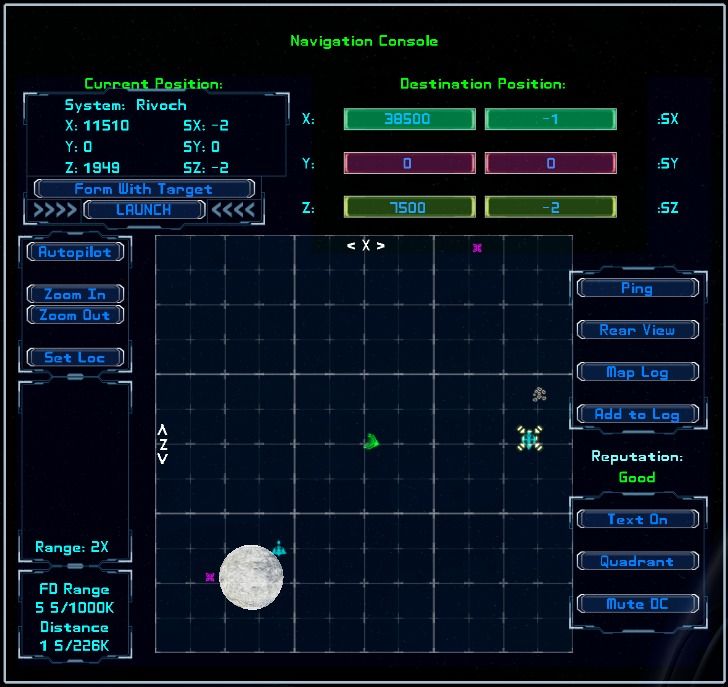
You want to jump to the trade station, so you right-click on your target and expect to zoom in on the sector where the station is located. Surprisingly, when you click (and, consequently, zoom in), the trade station doesn't show up. Ergo, you assume the Nav Map function is borked. But you'd be incorrect in your assumption ... easily proved if you now left-click on the "Rear View" button located on the right side of the map. 'Cause, when you do, you'll see something like this:
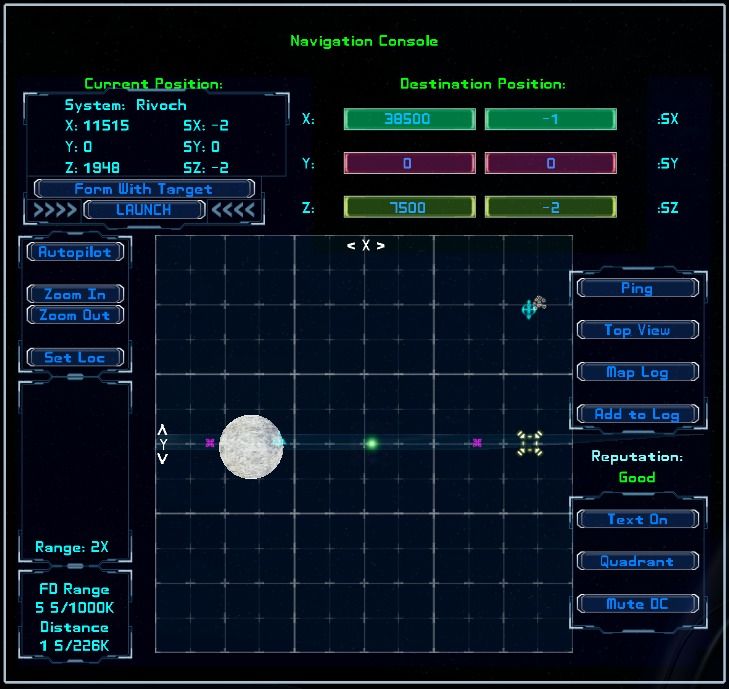
Hopefully, a light bulb goes on and you realize that the trade station is above your current location. Nonetheless, your jump point is still on the same level as your ship. You can confirm this fact by examining the "Destination Position" windows. See the "SY" window? It displays the current Y-sector destination coordinate and, in this example, it still shows a zero ... meaning your destination jump point is set to SY=0! But the trade station is at SY=1! So, before going back to the map's Top View, left-click on the trade station. While you're at it, check the "SY" window and observe that the destination Y coordinate has changed to reflect the proper sector coordinate of your intended target (the trade station).
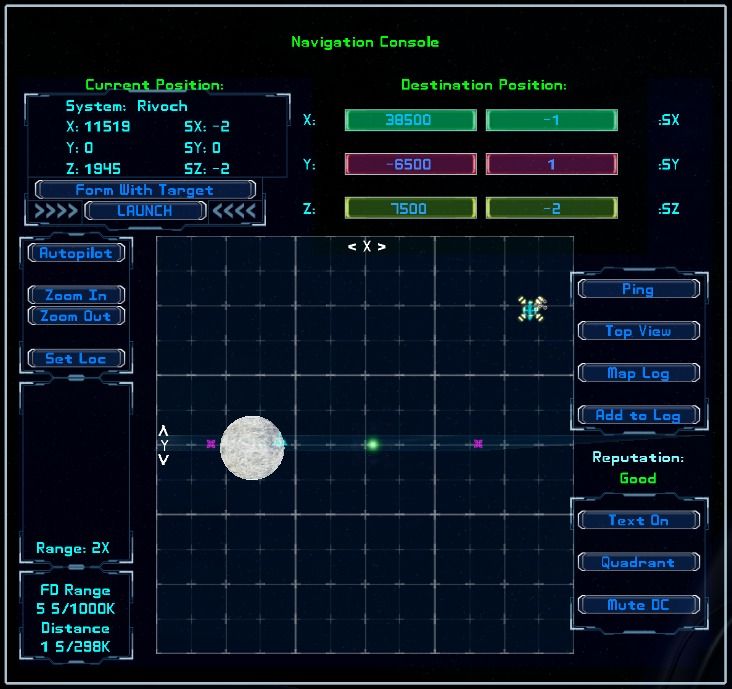 Now, left-click on the "Top View" button to flip the Nav Map back to a top-down view. Finally, right-click on the trade station ... and you'll zoom in on the trade station. Simple. Now you can jump. Set your pitch to zero and launch. Btw, if your target is a gate, you'll also want to set your heading to zero.
-
Erranty
- Ensign
- Posts: 4
- Joined: Tue May 15, 2012 3:56 am
Not a Map Bug
Yes, I tried that when I ended up jumping well below a planet. It works, but I didn't need to do that before and the Stations didn't disappear just because they were on a different Y axis. I used to be able to right click them from well across the system. What changed and how could we make it work like it used to again? This was a very confusing thing and would probably cause a lot of difficulty for new players.
Sys Specs:
3.2 Ghz Quad Core (AMD PHENOM II)
Two DDR2-800 2GB RAM cards (3072MB)
512MB nVidia Gfx Card (Zotac 220), 48 Stream Processors. (Coupled with my onboard its 1024MB)
[Edited on 5-15-2012 by Erranty]
Sys Specs:
3.2 Ghz Quad Core (AMD PHENOM II)
Two DDR2-800 2GB RAM cards (3072MB)
512MB nVidia Gfx Card (Zotac 220), 48 Stream Processors. (Coupled with my onboard its 1024MB)
[Edited on 5-15-2012 by Erranty]
-
Vice
- Administrator
- Posts: 12227
- Joined: Fri Apr 25, 2003 1:38 am
Not a Map Bug
So far, every time we've been able to follow up on such a condition, it's always turned out to be the player being on a different SY plane than the station or other object they are trying to target. So a screenshot will help determine what might be happening, whether it is that or something else.
Edit: I'm also not aware of an instance where it's possible to right click target a remote station in a different sector on a different SY plane. You can left click to get close to it though.
[Edited on 5-15-2012 by Vice]
Edit: I'm also not aware of an instance where it's possible to right click target a remote station in a different sector on a different SY plane. You can left click to get close to it though.
[Edited on 5-15-2012 by Vice]
-
Erranty
- Ensign
- Posts: 4
- Joined: Tue May 15, 2012 3:56 am
Not a Map Bug
I'm fairly certain you're right about that being a cause, but this has only been an issue since the last update.
When I made half my stations, they were around Asteroids so I could mine materials to sell quickly. I never adjusted my Y coordinates when jumping to them so it never really mattered, it seemed like they were all on the Y=0 plane.
http://i5.photobucket.com/albums/y156/b ... 9/evo1.jpg
http://i5.photobucket.com/albums/y156/b ... 9/evo2.jpg
http://i5.photobucket.com/albums/y156/b ... 9/evo3.jpg
http://i5.photobucket.com/albums/y156/b ... 9/evo4.jpg
[Edited on 5-15-2012 by Erranty]
When I made half my stations, they were around Asteroids so I could mine materials to sell quickly. I never adjusted my Y coordinates when jumping to them so it never really mattered, it seemed like they were all on the Y=0 plane.
http://i5.photobucket.com/albums/y156/b ... 9/evo1.jpg

http://i5.photobucket.com/albums/y156/b ... 9/evo2.jpg

http://i5.photobucket.com/albums/y156/b ... 9/evo3.jpg

http://i5.photobucket.com/albums/y156/b ... 9/evo4.jpg

[Edited on 5-15-2012 by Erranty]
-
Vice
- Administrator
- Posts: 12227
- Joined: Fri Apr 25, 2003 1:38 am
Not a Map Bug
The example there in those screenshots puts the station above you 1 sector on SY. So to right click on that station, you'd need to jump up vertically one sector, then plot the precise jump point to it. Or you could simply use left click to plot a jump point near it while it's on a different SY plane.
-
Marvin
- Global Moderator
- Posts: 14373
- Joined: Wed Mar 04, 2009 5:47 am
- Location: Fallon-Reno
Not a Map Bug
The station you're trying to jump to is the exact same station as seen in the above example. Notice how its SY axis is 1 ... while your SY is 0.-
Erranty
- Ensign
- Posts: 4
- Joined: Tue May 15, 2012 3:56 am
Not a Map Bug
So, with Y mattering now, can we make stations 2 sectors apart on the Y axis without needing to worry about the X axis too? Or is it still restricted by the X axis?
-
Marvin
- Global Moderator
- Posts: 14373
- Joined: Wed Mar 04, 2009 5:47 am
- Location: Fallon-Reno
Not a Map Bug
Yes, you can build stations either above or below the galactic horizon (SY=0). It's called the Gorf formation. 