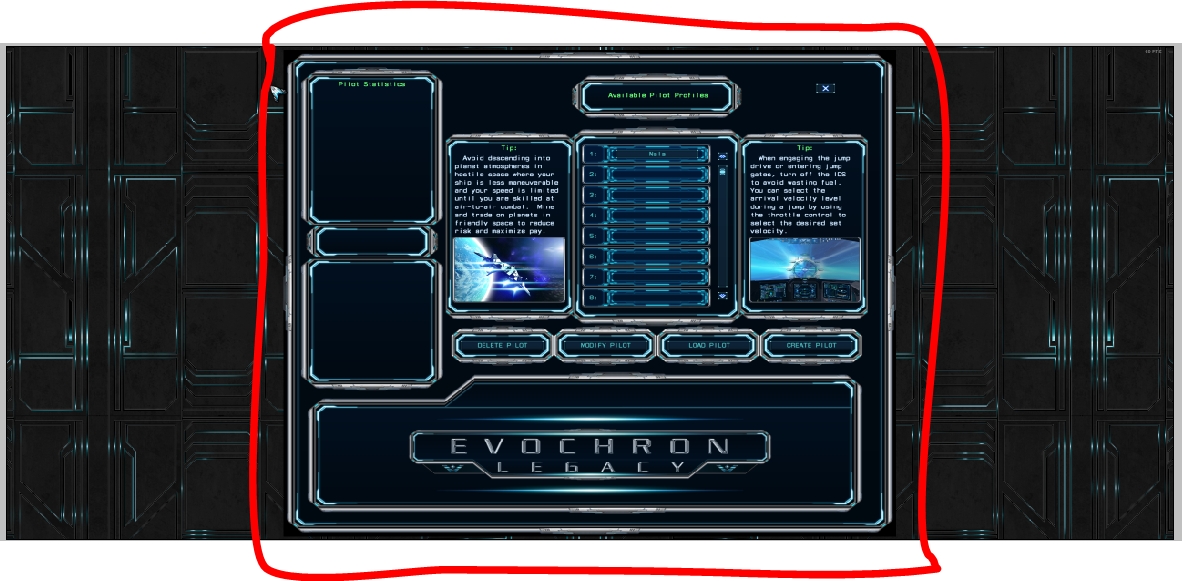
I have a new screen and wanted to play Evochron Legacy again today. I noticed that the game does not quite support my screen.
As you can see, the background image continues. The rest stays in the middle of the screen. The text is therefore illegible. Unfortunately, that is also the case in the spaceship.
Is there perhaps a solution to the problem?
System properties:
- AMD FX 6300
- Windows 10
- RAM: 16 GB
- GPU: Nvidia GTX 970
The aspect ratio (including width), scaling, and placement all look correct within the game's field of display, but it appears to be something else outside and vertically of it. Even the resolution of your sample image is below the 2560X1080 you refer to (being 1182X581). Is that a full screen image? If so, then something appears to have reduced it a lot. Here are a couple of things to try:
- Check your desktop resolution. If it is set to something below 2560X1080 and the game is set to 'Optimized' for a display resolution, then the game will submit to that desktop setting and default to the lower resolution. From your sample image, it appears your output resolution is actually half of your potential desktop resolution, which would be 1180X540. So if your desktop resolution is indeed below where you want it, change that to 2560X1080, then launch the game again and it should submit to the new resolution as well.
- Select the 2560X1080 resolution manually in the game's Options menu. Then also change the screen mode to a 'Locked (Full Screen)' mode, exit and restart the game. This will attempt to force the desired resolution. If it doesn't work, you can remove the 'sw.cfg' file from the save data folder (default location is c:\sw3dg\EvochronLegacy) and let the game rebuild it next time you launch it.
One or the other will likely allow the game to run at a better resolution. A 540 vertical resolution is indeed pretty low for this game as it generally needs a 1080 resolution minimum for ideal image quality.