

joystick issue
-
poneytailman
- Ensign

- Posts: 44
- Joined: Sun Mar 01, 2015 7:05 am
joystick issue
have a logitech extreme pro, am looking for the default settings in the configuration menu. i have tried to go to the configuration site that vice put up but keep getting error code. IDS controls was panning way to the left, so tried to put in dead zones..still panning. so tried to redo axis, now all messed up. keyboard throddle won't work now? Am lost, if anyone has in info and default setting please post. Thank you.
-
Marvin

- Global Moderator

- Posts: 14373
- Joined: Wed Mar 04, 2009 5:47 am
- Location: Fallon-Reno
joystick issue
I use a Logictech Extreme 3D Pro. I've never had to save the stick profile so I'm not sure which file to attach. Maybe Vice will clue me in.
-
Vice

- Administrator

- Posts: 12227
- Joined: Fri Apr 25, 2003 1:38 am
joystick issue
I'll need more information to provide assistance:
- What default settings in the configuration menu?
- What configuration 'site' referred to?
- What error code did you see?
Keyboard throttle control won't work if you map an axis channel control to it since the axis control is given priority. What I'd suggest you do is review the instructions included with the game on configuring a control device. In short, all you need to do is click on a responding axis channel, then click on the control you want to map to it. If you want to remove an axis control, click on the axis channel, then click on 'No Axis Control'.
- What default settings in the configuration menu?
- What configuration 'site' referred to?
- What error code did you see?
Keyboard throttle control won't work if you map an axis channel control to it since the axis control is given priority. What I'd suggest you do is review the instructions included with the game on configuring a control device. In short, all you need to do is click on a responding axis channel, then click on the control you want to map to it. If you want to remove an axis control, click on the axis channel, then click on 'No Axis Control'.
-
Marvin
- Global Moderator
- Posts: 14373
- Joined: Wed Mar 04, 2009 5:47 am
- Location: Fallon-Reno
joystick issue
P.S. My stick is set up same as for an aircraft, with the twist axis used for yaw (not bank/roll). Unlike with my Cyborg Rumble Stick, I never have problems with the Logitech drifting. I use the in-game "Configure Controls" options menu (press the ESC button when in the game) to make the following settings:
- Control Mode: Joystick
- Sensitivity: Low
- Deadzone: 2
-
poneytailman
- Ensign
- Posts: 44
- Joined: Sun Mar 01, 2015 7:05 am
joystick issue
i have 10 axis settings in the configuration menu, I have the turn, pitch, rotate settings correct, but dont know the rest throddle control was working on tkeyboard but has sinced stopped. The site was one that was up on the technical link and the error code was 404
-
poneytailman
- Ensign
- Posts: 44
- Joined: Sun Mar 01, 2015 7:05 am
joystick issue
Marvin, could you look at your configuration menu, there are 10 axis slots. could ou send me what you have in each slot? Such as turn, pitch roll...etc? i do believe only 9 are used.
-
poneytailman
- Ensign
- Posts: 44
- Joined: Sun Mar 01, 2015 7:05 am
joystick issue
Got most fixed but IDS still not tracking and can't get the throttle controls to work on the keyboard, any help would be greatly appreciated.
-
Vice
- Administrator
- Posts: 12227
- Joined: Fri Apr 25, 2003 1:38 am
joystick issue
Just unbind any axis control you have mapped to throttle. Not sure what you mean by IDS not tracking.
-
poneytailman
- Ensign
- Posts: 44
- Joined: Sun Mar 01, 2015 7:05 am
joystick issue
the small rectangle that shows your heading on the hud isnt working, tracking to the way i want to head
-
poneytailman
- Ensign
- Posts: 44
- Joined: Sun Mar 01, 2015 7:05 am
joystick issue
All fixed except the small rectangle in the hud. when running at max speed the rectangle will come close to the center of the hub but the slower i go the farther away it moves. if i throttle down to the slowest speed it will move completely off the screen and won't come back.
-
poneytailman
- Ensign
- Posts: 44
- Joined: Sun Mar 01, 2015 7:05 am
joystick issue
Like when I'm going to jump to a gate or anywhere else, I line the ship up with the coords and wait till the blue rectange comes and lines up and then you jump, but it never comes around to the point I'm heading.
-
Vice
- Administrator
- Posts: 12227
- Joined: Fri Apr 25, 2003 1:38 am
joystick issue
You likely still have an axis control mapped to horizontal and/or vertical thrusters. You'll either need to clear those axis bindings if you don't want to use them, or just center them on your device if you do want to use them.
-
poneytailman
- Ensign
- Posts: 44
- Joined: Sun Mar 01, 2015 7:05 am
joystick issue
I unbinded them and now works good, thank you for your help Vice
-
Vice
- Administrator
- Posts: 12227
- Joined: Fri Apr 25, 2003 1:38 am
joystick issue
No problem, enjoy the game.
-
Marvin
- Global Moderator
- Posts: 14373
- Joined: Wed Mar 04, 2009 5:47 am
- Location: Fallon-Reno
joystick issue
I re-mapped the keyboard arrow keys to the maneuvering thrusters. They can come in handy when your engine dies. Btw, keep in mind that the rectangle (and your vector) is affected by gravity and planetary spin. At least, if it's the same rectangle I'm thinking of.
P.S. This is the rectangle I'm thinking about:
[align=center]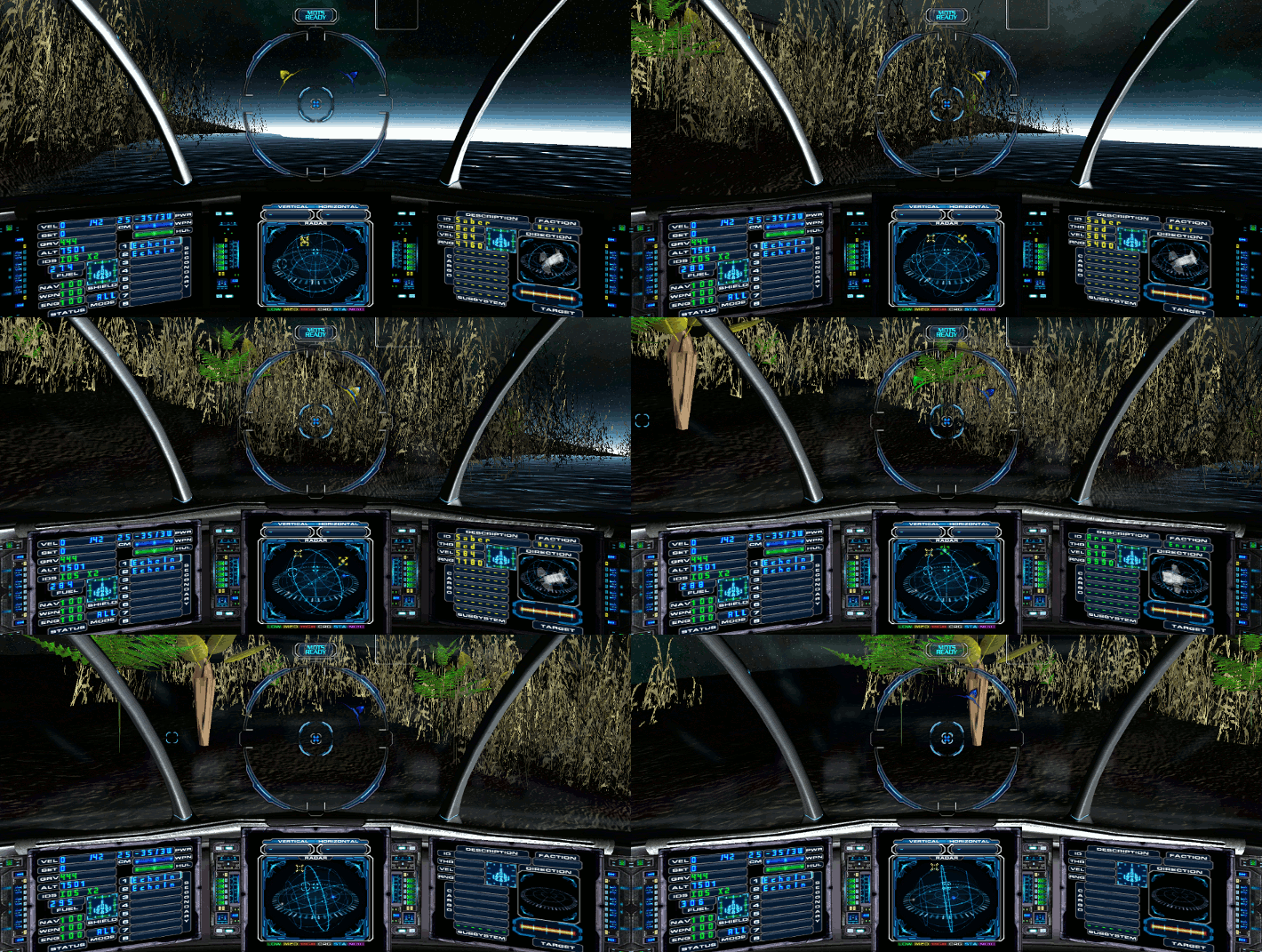 [/align]
The blue rectangle is the one which will appear to be drifting when the ship is on a planet or being pulled by gravity. On a planet, you can tell which way the planet is rotating by turning until the rectangle is on the nose.
[Edited on 4-12-2015 by Marvin]
P.S. This is the rectangle I'm thinking about:
[align=center]
[/align]The blue rectangle is the one which will appear to be drifting when the ship is on a planet or being pulled by gravity. On a planet, you can tell which way the planet is rotating by turning until the rectangle is on the nose.
[Edited on 4-12-2015 by Marvin]