

does anyone know if all systems have some planet or star?
-
zzone
- Ensign

- Posts: 16
- Joined: Wed Jul 16, 2014 6:10 pm
does anyone know if all systems have some planet or star?
There are systems in Evochron empty or all systems have some planet or star. because I found 3 new systems below Deneb, but could not find any planet or star in them.
-
SeeJay

- Captain

- Posts: 3507
- Joined: Wed Aug 11, 2010 9:03 am
- Location: Sweden
does anyone know if all systems have some planet or star?
The system name you see on your navmap is
the name of the nearest planet. It changes when you
cross the "line" where you have equal distance to
both planets. Once a planet is found, there should be
a star nearby. Check how the light hits the planet.
On my website there us a tool for finding new planets.
It does all the hard work for you.
the name of the nearest planet. It changes when you
cross the "line" where you have equal distance to
both planets. Once a planet is found, there should be
a star nearby. Check how the light hits the planet.
On my website there us a tool for finding new planets.
It does all the hard work for you.
\"Nothing is impossible, it only takes a bit longer!\"
\"We are not retreating, we are advancing in another direction!\"
http://evochron.junholt.se (Old)
http://www.evochron2.junholt.se (New)
http://mercenary.junholt.se (Map)
http://www.junholt.se/evoschool/index.htm (No spoilers)
-8- Bzzzzzzzzz! -8- -8-

\"We are not retreating, we are advancing in another direction!\"
http://evochron.junholt.se (Old)
http://www.evochron2.junholt.se (New)
http://mercenary.junholt.se (Map)
http://www.junholt.se/evoschool/index.htm (No spoilers)
-8- Bzzzzzzzzz! -8- -8-
-
zzone
- Ensign
- Posts: 16
- Joined: Wed Jul 16, 2014 6:10 pm
does anyone know if all systems have some planet or star?
Actually I looked at your website and thought of beginning difficulty using their tool, so I used a tutorial found on cadets del espacio site. But still ran the H158 system and could not find anything. is there any tutorial showing how to use in practicing your tool?From post: 172500, Topic: tid=11594, author=SeeJay wrote:The system name you see on your navmap is
the name of the nearest planet. It changes when you
cross the "line" where you have equal distance to
both planets. Once a planet is found, there should be
a star nearby. Check how the light hits the planet.
On my website there us a tool for finding new planets.
It does all the hard work for you.
-
SeeJay
- Captain
- Posts: 3507
- Joined: Wed Aug 11, 2010 9:03 am
- Location: Sweden
does anyone know if all systems have some planet or star?
Yes. There should be on the site and Marvin also
posted here in the forum.
Systems on my map is named after the closest planet
to the star.
posted here in the forum.
Systems on my map is named after the closest planet
to the star.
\"Nothing is impossible, it only takes a bit longer!\"
\"We are not retreating, we are advancing in another direction!\"
http://evochron.junholt.se (Old)
http://www.evochron2.junholt.se (New)
http://mercenary.junholt.se (Map)
http://www.junholt.se/evoschool/index.htm (No spoilers)
-8- Bzzzzzzzzz! -8- -8-
\"We are not retreating, we are advancing in another direction!\"
http://evochron.junholt.se (Old)
http://www.evochron2.junholt.se (New)
http://mercenary.junholt.se (Map)
http://www.junholt.se/evoschool/index.htm (No spoilers)
-8- Bzzzzzzzzz! -8- -8-
-
Marvin

- Global Moderator

- Posts: 14373
- Joined: Wed Mar 04, 2009 5:47 am
- Location: Fallon-Reno
does anyone know if all systems have some planet or star?
I couldn't find the original post, so here it is again:
[align=center]SINGLE-PLANET TRILATERATION[/align]
Procedure
GRID SETUP
PLANET A & B SETUP
Allow time for the Map to update. When it does, you should see two circles radiating at different angles from one large dot (representing the known planet). The two circles should intersect at a certain point ... that's the rough location of your uncharted planet.
Mentally draw a straight line between the two smaller dots (the two crossover points) and then extend the line in one direction. Pick a point along the extended line and use the mouse cursor to get its sector coordinates (SX and SZ).
Note: the actual position of the unknown planet should be along a line perpendicular to the line you've just drawn; if both points A and B are on one side of the perpendicular, pick the third point which is on the opposite side (for a more accurate trilateration).
PLANET C SETUP
Check the Map again. Hopefully, you now have three circles and all three intersect at the same location. Use the mouse cursor to get the sector coordinates of that intersecting point. Head for those new coordinates.
When you arrive, have your Navigation Map zoomed all the way out (in case your cursor position was off a few sectors). If you don't see any planet, it might be either above or below the Galactic Plane. Try searching about 100 sectors straight up. If nothing is found, do the same thing, straight down. If you still don't find a planet, complain to SeeJay.
Example
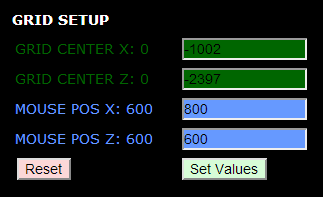
You start your exploration from Orion Delta, entering its coordinates as the center point: -1002 into the Grid Center X window and -2397 into the Grid Center Z window. Then you adjust the Mouse Position to whatever allows you to see the readout while observing the plots. Pressing "Set Values" enters the new parameters into the Tool.
[align=center]Grid Setup
 [/align]
After scrutinizing the Quadrant Map in the Navigation Console of the game, you decide to head toward the middle of the lower-left quadrant. Keeping an eye on the System name in the Current Position window, you notice that, eventually, the name changes from Orion Delta to T777 ... an uncharted planet! You disengage autopilot and start jumping back and forth until you find the exact sector where Orion Delta ends and T777 begins.
For the Planet A Setup, you enter Orion Delta's name, SX and SZ coordinates. You then enter the X and Z crossover points just discovered: -1203 and -2309, respectively. Pressing "Set Values" automatically initiates (1) a computation of the Radius (the offset between the known planet and the crossover point) and (2) a plot of the planet (large yellow dot), the crossover point (small yellow dot) and a yellow circle originating at the known planet (Orion Delta), with the radius equal to the offset.
Now you know that somewhere along the circumference of that circle there exists an uncharted planet.
You flip a coin to decide where to go next: heads you go north; tails you go south. Since the coin you flipped was the infamous 1994 Luca Pacioli 500 Lira (Italian) piece with two heads, you proceed north. Zig-zagging your way across the border between Orion Delta and T777, you fly far enough from the first plot to find a second crossover point.
For the Planet B Setup, you enter the same information for name, SX and SZ. You then enter the new crossover points: -1157 and -2284 and send the set values to the Map.
[align=center]Planet A & B Data

Planet A & B Plot
 [/align]
Now you can scrutinize the resulting plots and maybe get a little creative. For instance, you notice that the circle for plot A and the circle for plot B intersect. If you inserted the correct parameters, a line drawn from the known planet (Orion Delta) to the point where the circles intersect should be perpendicular to the line connecting the two crossover points.
You can also take a good guess at where a third crossover point might be ... somewhere along an extension of the line drawn between the crossover points. Eyeballing it and using the mouse cursor to get a position readout, you estimate that a crossover might be somewhere near -1076 SX, -2234 SZ.
[align=center]Eyeballing a Crossover Point
 [/align]
Arriving at those coordinates, you discover that you've gone past T777 and are now in D449. So you drop down a few sectors until you're back where Orion Delta crosses over to T777. The point of crossover is entered in the corresponding Planet C Setup windows: -1079 and -2241. With Orion Delta data properly entered, you again send the set values to the Map.
[align=center]Planet C Data
[/align]
Now you have three circles ... all intersecting in the same location. Placing the mouse cursor over the intersection point, the Mouse position readout displays coordinates of -1170,-2094 ... the likely location of the unknown planet.
[align=center]Pinpointing the Unknown
 [/align]
When you arrive at the destination coordinates, you discover that the sector is empty. If you haven't already done so, you zoom your Navigation map out to see as far from your current sector as possible. The area is still empty. Leastwise, it's empty for a few sectors above and below the galactic plane (SY=0). So you flip a coin: heads you go up; tails you go down. Since it's the same coin you used previously, you first search up (above the galactic plane).
After ascending a hundred sectors, you still find nothing. So you head straight back down to the galactic plane and then continue down below it. By the time you reach SY=-21, you spot a planet on your Navigation map. Planet T777! You enter its coordinates in your Map Log and then celebrate your new finding.
[align=center]Uncharted Planet
 [/align]
Note: the same method works for more than one known planet; to use two or three planets, substitute the known planetary name and coordinates in the appropriate windows for Planet B/C Setups.
[align=center]SINGLE-PLANET TRILATERATION[/align]
Procedure
GRID SETUP
- Set the Grid Center to the SX and SZ coordinates of your known planet.
- Adjust the Mouse Position as required (700,700 would be in the center of the Map).
- Click on the "Set Values" button.
PLANET A & B SETUP
- Enter the SX and SZ coordinates of the known planet in each of the SX and SZ Planet Setup windows.
- Pick a direction ... somewhere into unexplored space.
- In the Current Position window of the Navigation Console, watch for the System name to change.
- When it changes, pinpoint the exact sector where the change occurs ... back up if necessary.
- Enter the first crossover point (SX and SZ) into the windows for Planet A.
- Click on the "Set Values" button.
- Pick a direction and fly along the border between the known planet and the uncharted planet.
- After flying for about 50 sectors, again pinpoint the exact sector where the change occurs.
- Enter the second crossover point into the windows for Planet B.
Allow time for the Map to update. When it does, you should see two circles radiating at different angles from one large dot (representing the known planet). The two circles should intersect at a certain point ... that's the rough location of your uncharted planet.
Mentally draw a straight line between the two smaller dots (the two crossover points) and then extend the line in one direction. Pick a point along the extended line and use the mouse cursor to get its sector coordinates (SX and SZ).
Note: the actual position of the unknown planet should be along a line perpendicular to the line you've just drawn; if both points A and B are on one side of the perpendicular, pick the third point which is on the opposite side (for a more accurate trilateration).
PLANET C SETUP
- Fly out to the coordinates of the third point and, with any luck, a crossover point will be near by.
- Perform the same steps you did for Planets A and B.
Check the Map again. Hopefully, you now have three circles and all three intersect at the same location. Use the mouse cursor to get the sector coordinates of that intersecting point. Head for those new coordinates.
When you arrive, have your Navigation Map zoomed all the way out (in case your cursor position was off a few sectors). If you don't see any planet, it might be either above or below the Galactic Plane. Try searching about 100 sectors straight up. If nothing is found, do the same thing, straight down. If you still don't find a planet, complain to SeeJay.
Example
You start your exploration from Orion Delta, entering its coordinates as the center point: -1002 into the Grid Center X window and -2397 into the Grid Center Z window. Then you adjust the Mouse Position to whatever allows you to see the readout while observing the plots. Pressing "Set Values" enters the new parameters into the Tool.
[align=center]Grid Setup
[/align]After scrutinizing the Quadrant Map in the Navigation Console of the game, you decide to head toward the middle of the lower-left quadrant. Keeping an eye on the System name in the Current Position window, you notice that, eventually, the name changes from Orion Delta to T777 ... an uncharted planet! You disengage autopilot and start jumping back and forth until you find the exact sector where Orion Delta ends and T777 begins.
For the Planet A Setup, you enter Orion Delta's name, SX and SZ coordinates. You then enter the X and Z crossover points just discovered: -1203 and -2309, respectively. Pressing "Set Values" automatically initiates (1) a computation of the Radius (the offset between the known planet and the crossover point) and (2) a plot of the planet (large yellow dot), the crossover point (small yellow dot) and a yellow circle originating at the known planet (Orion Delta), with the radius equal to the offset.
Now you know that somewhere along the circumference of that circle there exists an uncharted planet.
You flip a coin to decide where to go next: heads you go north; tails you go south. Since the coin you flipped was the infamous 1994 Luca Pacioli 500 Lira (Italian) piece with two heads, you proceed north. Zig-zagging your way across the border between Orion Delta and T777, you fly far enough from the first plot to find a second crossover point.
For the Planet B Setup, you enter the same information for name, SX and SZ. You then enter the new crossover points: -1157 and -2284 and send the set values to the Map.
[align=center]Planet A & B Data
Planet A & B Plot
[/align]Now you can scrutinize the resulting plots and maybe get a little creative. For instance, you notice that the circle for plot A and the circle for plot B intersect. If you inserted the correct parameters, a line drawn from the known planet (Orion Delta) to the point where the circles intersect should be perpendicular to the line connecting the two crossover points.
You can also take a good guess at where a third crossover point might be ... somewhere along an extension of the line drawn between the crossover points. Eyeballing it and using the mouse cursor to get a position readout, you estimate that a crossover might be somewhere near -1076 SX, -2234 SZ.
[align=center]Eyeballing a Crossover Point
[/align]Arriving at those coordinates, you discover that you've gone past T777 and are now in D449. So you drop down a few sectors until you're back where Orion Delta crosses over to T777. The point of crossover is entered in the corresponding Planet C Setup windows: -1079 and -2241. With Orion Delta data properly entered, you again send the set values to the Map.
[align=center]Planet C Data
Now you have three circles ... all intersecting in the same location. Placing the mouse cursor over the intersection point, the Mouse position readout displays coordinates of -1170,-2094 ... the likely location of the unknown planet.
[align=center]Pinpointing the Unknown
[/align]When you arrive at the destination coordinates, you discover that the sector is empty. If you haven't already done so, you zoom your Navigation map out to see as far from your current sector as possible. The area is still empty. Leastwise, it's empty for a few sectors above and below the galactic plane (SY=0). So you flip a coin: heads you go up; tails you go down. Since it's the same coin you used previously, you first search up (above the galactic plane).
After ascending a hundred sectors, you still find nothing. So you head straight back down to the galactic plane and then continue down below it. By the time you reach SY=-21, you spot a planet on your Navigation map. Planet T777! You enter its coordinates in your Map Log and then celebrate your new finding.
[align=center]Uncharted Planet
Note: the same method works for more than one known planet; to use two or three planets, substitute the known planetary name and coordinates in the appropriate windows for Planet B/C Setups.
-
zzone
- Ensign
- Posts: 16
- Joined: Wed Jul 16, 2014 6:10 pm
does anyone know if all systems have some planet or star?
Thanks Marvin, When you leave the Sol system will try to use this tool
-
Major Grubert
- Lieutenant

- Posts: 465
- Joined: Wed May 16, 2012 10:24 am
- Location: Paris, France.
does anyone know if all systems have some planet or star?
when you enter a new system you can see the star light changing inside your cockpit
once you face the light source then you face the star
once you find the star you'll find the planet(s) around
stop the ship somewhere and use the 2 little shining tool on left and right of your cockpit and the nose, turn slowly the ship on different axis and look how the light change, once you get this you have to focus the ship on the light source
light change color when star color change, this give you another clue about when you leave a system for another one, see the point ? not following 2 times the same light source...
once you face the light source then you face the star
once you find the star you'll find the planet(s) around
stop the ship somewhere and use the 2 little shining tool on left and right of your cockpit and the nose, turn slowly the ship on different axis and look how the light change, once you get this you have to focus the ship on the light source
light change color when star color change, this give you another clue about when you leave a system for another one, see the point ? not following 2 times the same light source...
-
Major Grubert
- Lieutenant
- Posts: 465
- Joined: Wed May 16, 2012 10:24 am
- Location: Paris, France.
does anyone know if all systems have some planet or star?
if you look for stars and planets i guess you kind of explorer
as a kind of explorer you could use EM_tool in same time as evochron
in em tool at zoom 8 you can see/map stars and planet/objects with very good accuracy, and zoom lvl is little larger than the zoom 8 in the F1 navscreen in evo... so it's kind of being able to "see" a little more far
so, with star light you are able to locate new star, then you map it in em tool, then you jump around the star for find planets, they are usually at same plan level of the star, as you jump around you see new "system name", if light source changed it means you changed star system, if not it means planet
when located you can map them in em tool, it makes nice star system mapping
as a kind of explorer you could use EM_tool in same time as evochron
in em tool at zoom 8 you can see/map stars and planet/objects with very good accuracy, and zoom lvl is little larger than the zoom 8 in the F1 navscreen in evo... so it's kind of being able to "see" a little more far
so, with star light you are able to locate new star, then you map it in em tool, then you jump around the star for find planets, they are usually at same plan level of the star, as you jump around you see new "system name", if light source changed it means you changed star system, if not it means planet
when located you can map them in em tool, it makes nice star system mapping
-
DaveK

- Global Moderator
- Posts: 4161
- Joined: Mon Apr 19, 2010 9:04 pm
- Location: Leeds UK
does anyone know if all systems have some planet or star?
I think that your original post is here: http://www.starwraith.com/forum/viewtop ... 239&page=2From post: 172505, Topic: tid=11594, author=Marvin wrote:I couldn't find the original post, so here it is again:
[align=center]SINGLE-PLANET TRILATERATION[/align]

Callsign: Incoming
Life is like a sewer... what you get out of it depends on what you put into it. - Bob Newhart
Hell is being in a pure platinum asteroid field... with a diamond mining beam


Life is like a sewer... what you get out of it depends on what you put into it. - Bob Newhart
Hell is being in a pure platinum asteroid field... with a diamond mining beam
-
Maarschalk
- Captain
- Posts: 7641
- Joined: Wed Feb 25, 2009 12:24 am
- Location: USA, Also check your six!
does anyone know if all systems have some planet or star?
If a System has a name, it has Planets not so sure about a Star, as for example Rogue planets!.......


Arvoch Alliance Stat:

Evochron Legends Stats:

Evochron Mercenary Stats:

Darkness is the absence of Light as Evil is the absence of Good
Evochron Legends Stats:
Evochron Mercenary Stats:
Darkness is the absence of Light as Evil is the absence of Good