

 Yup, it works! I'll be completing a "how to" tomorrow (Saturday) and then see if I can insert it underneath your first post.
Added: Video Tutorial
-
Marvin

- Global Moderator

- Posts: 14373
- Joined: Wed Mar 04, 2009 5:47 am
- Location: Fallon-Reno
Added: Video Tutorial
Yup, it works! I'll be completing a "how to" tomorrow (Saturday) and then see if I can insert it underneath your first post.-
SeeJay

- Captain

- Posts: 3507
- Joined: Wed Aug 11, 2010 9:03 am
- Location: Sweden
Added: Video Tutorial
Thanks Marvin, appreciate it.
\"Nothing is impossible, it only takes a bit longer!\"
\"We are not retreating, we are advancing in another direction!\"
http://evochron.junholt.se (Old)
http://www.evochron2.junholt.se (New)
http://mercenary.junholt.se (Map)
http://www.junholt.se/evoschool/index.htm (No spoilers)
-8- Bzzzzzzzzz! -8- -8-

\"We are not retreating, we are advancing in another direction!\"
http://evochron.junholt.se (Old)
http://www.evochron2.junholt.se (New)
http://mercenary.junholt.se (Map)
http://www.junholt.se/evoschool/index.htm (No spoilers)
-8- Bzzzzzzzzz! -8- -8-
-
Marvin
- Global Moderator
- Posts: 14373
- Joined: Wed Mar 04, 2009 5:47 am
- Location: Fallon-Reno
Added: Video Tutorial
[align=center]SINGLE-PLANET TRILATERATION[/align]
Procedure
GRID SETUP
PLANET A & B SETUP
Allow time for the Map to update. When it does, you should see two circles radiating at different angles from one large dot (representing the known planet). The two circles should intersect at a certain point ... that's the rough location of your uncharted planet.
Mentally draw a straight line between the two smaller dots (the two crossover points) and then extend the line in one direction. Pick a point along the extended line and use the mouse cursor to get its sector coordinates (SX and SZ).
Note: the actual position of the unknown planet should be along a line perpendicular to the line you've just drawn; if both points A and B are on one side of the perpendicular, pick the third point which is on the opposite side (for a more accurate trilateration).
PLANET C SETUP
Check the Map again. Hopefully, you now have three circles and all three intersect at the same location. Use the mouse cursor to get the sector coordinates of that intersecting point. Head for those new coordinates.
When you arrive, have your Navigation Map zoomed all the way out (in case your cursor position was off a few sectors). If you don't see any planet, it might be either above or below the Galactic Plane. Try searching about 100 sectors straight up. If nothing is found, do the same thing, straight down. If you still don't find a planet, complain to SeeJay.
Example
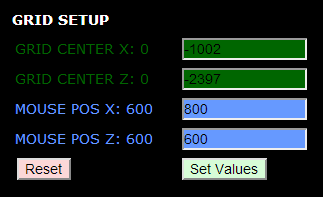
You start your exploration from Orion Delta, entering its coordinates as the center point: -1002 into the Grid Center X window and -2397 into the Grid Center Z window. Then you adjust the Mouse Position to whatever allows you to see the readout while observing the plots. Pressing "Set Values" enters the new parameters into the Tool.
[align=center]Grid Setup
 [/align]
After scrutinizing the Quadrant Map in the Navigation Console of the game, you decide to head toward the middle of the lower-left quadrant. Keeping an eye on the System name in the Current Position window, you notice that, eventually, the name changes from Orion Delta to T777 ... an uncharted planet! You disengage autopilot and start jumping back and forth until you find the exact sector where Orion Delta ends and T777 begins.
For the Planet A Setup, you enter Orion Delta's name, SX and SZ coordinates. You then enter the X and Z crossover points just discovered: -1203 and -2309, respectively. Pressing "Set Values" automatically initiates (1) a computation of the Radius (the offset between the known planet and the crossover point) and (2) a plot of the planet (large yellow dot), the crossover point (small yellow dot) and a yellow circle originating at the known planet (Orion Delta), with the radius equal to the offset.
Now you know that somewhere along the circumference of that circle there exists an uncharted planet.
You flip a coin to decide where to go next: heads you go north; tails you go south. Since the coin you flipped was the infamous 1994 Luca Pacioli 500 Lira (Italian) piece with two heads, you proceed north. Zig-zagging your way across the border between Orion Delta and T777, you fly far enough from the first plot to find a second crossover point.
For the Planet B Setup, you enter the same information for name, SX and SZ. You then enter the new crossover point: -1157 and -2284 and send the set values to the Map.
[align=center]Planet A & B Data

Planet A & B Plot
 [/align]
Now you can scrutinize the resulting plots and maybe get a little creative. For instance, you notice that the circle for plot A and the circle for plot B intersect. If you inserted the correct parameters, a line drawn from the known planet (Orion Delta) to the point where the circles intersect should be perpendicular to the line connecting the two crossover points.
You can also take a good guess at where a third crossover point might be ... somewhere along an extension of the line drawn between the crossover points. Eyeballing it and using the mouse cursor to get a position readout, you estimate that a crossover might be somewhere near -1076 SX, -2234 SZ.
[align=center]Eyeballing a Crossover Point
 [/align]
Arriving at those coordinates, you discover that you've gone past T777 and are now in D449. So you drop down a few sectors until you're back where Orion Delta crosses over to T777. The point of crossover is entered in the corresponding Planet C Setup windows: -1079 and -2241. With Orion Delta data properly entered, you again send the set values to the Map.
[align=center]Planet C Data
[/align]
Now you have three circles ... all intersecting in the same location. Placing the mouse cursor over the intersection point, the Mouse position readout displays coordinates of -1170,-2094 ... the likely location of the unknown planet.
[align=center]Pinpointing the Unknown
 [/align]
When you arrive at the destination coordinates, you discover that the sector is empty. If you haven't already done so, you zoom your Navigation map out to see as far from your current sector as possible. The area is still empty. Leastwise, it's empty for a few sectors above and below the galactic plane (SY=0). So you flip a coin: heads you go up; tails you go down. Since it's the same coin you used previously, you first search up (above the galactic plane).
After ascending a hundred sectors, you still find nothing. So you head straight back down to the galactic plane and then continue down below it. By the time you reach SY=-21, you spot a planet on your Navigation map. Planet T777! You enter its coordinates in your Map Log and then celebrate your new finding.
[align=center]Uncharted Planet
 [/align]
Note: the same method works for more than one known planet; to use two or three planets, substitute the known planetary name and coordinates in the appropriate windows for Planet B/C Setups.
[Edited on 2-23-2014 by Marvin]
Procedure
GRID SETUP
- Set the Grid Center to the SX and SZ coordinates of your known planet.
- Adjust the Mouse Position as required (700,700 would be in the center of the Map).
- Click on the "Set Values" button.
PLANET A & B SETUP
- Enter the SX and SZ coordinates of the known planet in each of the SX and SZ Planet Setup windows.
- Pick a direction ... somewhere into unexplored space.
- In the Current Position window of the Navigation Console, watch for the System name to change.
- When it changes, pinpoint the exact sector where the change occurs ... back up if necessary.
- Enter the first crossover point (SX and SZ) into the windows for Planet A.
- Click on the "Set Values" button.
- Pick a direction and fly along the border between the known planet and the uncharted planet.
- After flying for about 50 sectors, again pinpoint the exact sector where the change occurs.
- Enter the second crossover point into the windows for Planet B.
Allow time for the Map to update. When it does, you should see two circles radiating at different angles from one large dot (representing the known planet). The two circles should intersect at a certain point ... that's the rough location of your uncharted planet.
Mentally draw a straight line between the two smaller dots (the two crossover points) and then extend the line in one direction. Pick a point along the extended line and use the mouse cursor to get its sector coordinates (SX and SZ).
Note: the actual position of the unknown planet should be along a line perpendicular to the line you've just drawn; if both points A and B are on one side of the perpendicular, pick the third point which is on the opposite side (for a more accurate trilateration).
PLANET C SETUP
- Fly out to the coordinates of the third point and, with any luck, a crossover point will be near by.
- Perform the same steps you did for Planets A and B.
Check the Map again. Hopefully, you now have three circles and all three intersect at the same location. Use the mouse cursor to get the sector coordinates of that intersecting point. Head for those new coordinates.
When you arrive, have your Navigation Map zoomed all the way out (in case your cursor position was off a few sectors). If you don't see any planet, it might be either above or below the Galactic Plane. Try searching about 100 sectors straight up. If nothing is found, do the same thing, straight down. If you still don't find a planet, complain to SeeJay.
Example
You start your exploration from Orion Delta, entering its coordinates as the center point: -1002 into the Grid Center X window and -2397 into the Grid Center Z window. Then you adjust the Mouse Position to whatever allows you to see the readout while observing the plots. Pressing "Set Values" enters the new parameters into the Tool.
[align=center]Grid Setup
[/align]After scrutinizing the Quadrant Map in the Navigation Console of the game, you decide to head toward the middle of the lower-left quadrant. Keeping an eye on the System name in the Current Position window, you notice that, eventually, the name changes from Orion Delta to T777 ... an uncharted planet! You disengage autopilot and start jumping back and forth until you find the exact sector where Orion Delta ends and T777 begins.
For the Planet A Setup, you enter Orion Delta's name, SX and SZ coordinates. You then enter the X and Z crossover points just discovered: -1203 and -2309, respectively. Pressing "Set Values" automatically initiates (1) a computation of the Radius (the offset between the known planet and the crossover point) and (2) a plot of the planet (large yellow dot), the crossover point (small yellow dot) and a yellow circle originating at the known planet (Orion Delta), with the radius equal to the offset.
Now you know that somewhere along the circumference of that circle there exists an uncharted planet.
You flip a coin to decide where to go next: heads you go north; tails you go south. Since the coin you flipped was the infamous 1994 Luca Pacioli 500 Lira (Italian) piece with two heads, you proceed north. Zig-zagging your way across the border between Orion Delta and T777, you fly far enough from the first plot to find a second crossover point.
For the Planet B Setup, you enter the same information for name, SX and SZ. You then enter the new crossover point: -1157 and -2284 and send the set values to the Map.
[align=center]Planet A & B Data
Planet A & B Plot
[/align]Now you can scrutinize the resulting plots and maybe get a little creative. For instance, you notice that the circle for plot A and the circle for plot B intersect. If you inserted the correct parameters, a line drawn from the known planet (Orion Delta) to the point where the circles intersect should be perpendicular to the line connecting the two crossover points.
You can also take a good guess at where a third crossover point might be ... somewhere along an extension of the line drawn between the crossover points. Eyeballing it and using the mouse cursor to get a position readout, you estimate that a crossover might be somewhere near -1076 SX, -2234 SZ.
[align=center]Eyeballing a Crossover Point
[/align]Arriving at those coordinates, you discover that you've gone past T777 and are now in D449. So you drop down a few sectors until you're back where Orion Delta crosses over to T777. The point of crossover is entered in the corresponding Planet C Setup windows: -1079 and -2241. With Orion Delta data properly entered, you again send the set values to the Map.
[align=center]Planet C Data
Now you have three circles ... all intersecting in the same location. Placing the mouse cursor over the intersection point, the Mouse position readout displays coordinates of -1170,-2094 ... the likely location of the unknown planet.
[align=center]Pinpointing the Unknown
[/align]When you arrive at the destination coordinates, you discover that the sector is empty. If you haven't already done so, you zoom your Navigation map out to see as far from your current sector as possible. The area is still empty. Leastwise, it's empty for a few sectors above and below the galactic plane (SY=0). So you flip a coin: heads you go up; tails you go down. Since it's the same coin you used previously, you first search up (above the galactic plane).
After ascending a hundred sectors, you still find nothing. So you head straight back down to the galactic plane and then continue down below it. By the time you reach SY=-21, you spot a planet on your Navigation map. Planet T777! You enter its coordinates in your Map Log and then celebrate your new finding.
[align=center]Uncharted Planet
Note: the same method works for more than one known planet; to use two or three planets, substitute the known planetary name and coordinates in the appropriate windows for Planet B/C Setups.
[Edited on 2-23-2014 by Marvin]
-
Marvin
- Global Moderator
- Posts: 14373
- Joined: Wed Mar 04, 2009 5:47 am
- Location: Fallon-Reno
Added: Video Tutorial
From post: 167436, Topic: tid=11239, author=Marvin wrote:
 I tried splitting the thread and inserting the tutorial ... no luck. When I merge the two threads again, the tutorial gets bumped to the bottom post.
-
SeeJay
- Captain
- Posts: 3507
- Joined: Wed Aug 11, 2010 9:03 am
- Location: Sweden
Added: Video Tutorial
Wow, excellent tutorial Marv.
Now even I understand how it works. Perfect. ;-)
Now even I understand how it works. Perfect. ;-)
\"Nothing is impossible, it only takes a bit longer!\"
\"We are not retreating, we are advancing in another direction!\"
http://evochron.junholt.se (Old)
http://www.evochron2.junholt.se (New)
http://mercenary.junholt.se (Map)
http://www.junholt.se/evoschool/index.htm (No spoilers)
-8- Bzzzzzzzzz! -8- -8-
\"We are not retreating, we are advancing in another direction!\"
http://evochron.junholt.se (Old)
http://www.evochron2.junholt.se (New)
http://mercenary.junholt.se (Map)
http://www.junholt.se/evoschool/index.htm (No spoilers)
-8- Bzzzzzzzzz! -8- -8-
-
Marvin
- Global Moderator
- Posts: 14373
- Joined: Wed Mar 04, 2009 5:47 am
- Location: Fallon-Reno
Added: Video Tutorial
Irony. I love it. 
-
SeeJay
- Captain
- Posts: 3507
- Joined: Wed Aug 11, 2010 9:03 am
- Location: Sweden
Added: Video Tutorial
On request I added a note field below the map.
Keep in mind that it will loose all data if you refresh the page. Using the buttons on top will not clear the data tho.
I have also added a few fields on top.
- CALCULATED SX, SY, SZ (Can be used as note fields now, they won't clear when pressing Reset)
- PLANET A-C, SY and CROSSOVER-POINT X, Y, Z.
Those fields doesn't do anything yet. I'm experimenting with some math to calculate the
position of the unknown planet as well as having the Visual map. If I get it to work, I'll implement it
but if I fail, I'll just remove those fields.
I also added a System Form in the Tools section.
It's a spread sheet (xls and ods) for taking notes of your
findings. Then send the spread sheet to me (if you want) and I'll
add them to the map.
[Edited on 2014-2-23 by SeeJay]
Keep in mind that it will loose all data if you refresh the page. Using the buttons on top will not clear the data tho.
I have also added a few fields on top.
- CALCULATED SX, SY, SZ (Can be used as note fields now, they won't clear when pressing Reset)
- PLANET A-C, SY and CROSSOVER-POINT X, Y, Z.
Those fields doesn't do anything yet. I'm experimenting with some math to calculate the
position of the unknown planet as well as having the Visual map. If I get it to work, I'll implement it
but if I fail, I'll just remove those fields.
I also added a System Form in the Tools section.
It's a spread sheet (xls and ods) for taking notes of your
findings. Then send the spread sheet to me (if you want) and I'll
add them to the map.
[Edited on 2014-2-23 by SeeJay]
\"Nothing is impossible, it only takes a bit longer!\"
\"We are not retreating, we are advancing in another direction!\"
http://evochron.junholt.se (Old)
http://www.evochron2.junholt.se (New)
http://mercenary.junholt.se (Map)
http://www.junholt.se/evoschool/index.htm (No spoilers)
-8- Bzzzzzzzzz! -8- -8-
\"We are not retreating, we are advancing in another direction!\"
http://evochron.junholt.se (Old)
http://www.evochron2.junholt.se (New)
http://mercenary.junholt.se (Map)
http://www.junholt.se/evoschool/index.htm (No spoilers)
-8- Bzzzzzzzzz! -8- -8-
-
Marvin
- Global Moderator
- Posts: 14373
- Joined: Wed Mar 04, 2009 5:47 am
- Location: Fallon-Reno
Added: Video Tutorial
I see you also added it to the Tools section of your website. That's quite a list of tools!-
DaveK

- Global Moderator
- Posts: 4161
- Joined: Mon Apr 19, 2010 9:04 pm
- Location: Leeds UK
Added: Video Tutorial
Thanks Marvin - I think I'm finally getting the hang of trilateration!From post: 167436, Topic: tid=11239, author=Marvin wrote:

Callsign: Incoming
Life is like a sewer... what you get out of it depends on what you put into it. - Bob Newhart
Hell is being in a pure platinum asteroid field... with a diamond mining beam


Life is like a sewer... what you get out of it depends on what you put into it. - Bob Newhart
Hell is being in a pure platinum asteroid field... with a diamond mining beam
-
Marvin
- Global Moderator
- Posts: 14373
- Joined: Wed Mar 04, 2009 5:47 am
- Location: Fallon-Reno
Added: Video Tutorial
Don't thank me ... thank SeeJay. His program makes it a lot easier to visualize what's going on. And it saves on graph paper. -
Nokternl
- Ensign

- Posts: 2
- Joined: Thu Feb 20, 2014 10:39 am
Added: Video Tutorial
First post for me.
I've met a lot of you in game over the last week since I started!
Couldn't get access to the forum til today... Thanks Vice/SeeJay.
I've been working extensively with SeeJay's tools to learn how to discover previously undocumented star systems and planets, as I LOVE the fact that this game has been around for so long, with still a huge number of undiscovered areas!
I understand that even though SeeJay has created the site, and Marvin has documented a great walk through, the discovery of these planets is still a tough job at times!
You must be precise when determining your crossover points....
Anyway, I had decided to create a video tutorial on how to pinpoint these undiscovered planets and then their associated star, as I believe that it is much easier for someone to 'see' it done.
Yes, I did this 'live' and on stream, as I discovered another system. Lucky it worked
This is a long video, but you SHOULD only have to watch it once to understand the discovery process precisely enough to replicate it and start discovering your own worlds!
Please feel free to ask questions, as I may have missed something or failed to explain something properly.
Enjoy!
https://www.youtube.com/watch?v=5rIqbFCmyOQ
Regards,
Nokternl
Non Toxic Gamers
www.nontoxicgamers.com
I've met a lot of you in game over the last week since I started!
Couldn't get access to the forum til today... Thanks Vice/SeeJay.
I've been working extensively with SeeJay's tools to learn how to discover previously undocumented star systems and planets, as I LOVE the fact that this game has been around for so long, with still a huge number of undiscovered areas!
I understand that even though SeeJay has created the site, and Marvin has documented a great walk through, the discovery of these planets is still a tough job at times!
You must be precise when determining your crossover points....
Anyway, I had decided to create a video tutorial on how to pinpoint these undiscovered planets and then their associated star, as I believe that it is much easier for someone to 'see' it done.
Yes, I did this 'live' and on stream, as I discovered another system. Lucky it worked
This is a long video, but you SHOULD only have to watch it once to understand the discovery process precisely enough to replicate it and start discovering your own worlds!
Please feel free to ask questions, as I may have missed something or failed to explain something properly.
Enjoy!
https://www.youtube.com/watch?v=5rIqbFCmyOQ
Regards,
Nokternl
Non Toxic Gamers
www.nontoxicgamers.com
-
Marvin
- Global Moderator
- Posts: 14373
- Joined: Wed Mar 04, 2009 5:47 am
- Location: Fallon-Reno
Added: Video Tutorial
Somewhere around the 12-minute mark, you discuss fuel requirements and time en route ... as well as how to conserve fuel and to shorten the time it takes to reach a crossover point. Oddly enough, there's a tool for that: The Travel Buddy. I suggest you use the 2014 model ... slightly more accurate and it does all the math for you. For exploration, plug in a set of destination coordinates somewhere in the direction you plan to travel ... then compare the Buddy's output with the fuel you have on board. As for conservation, the Buddy will remind you if you've left IDS on or haven't yet set your energy to "conservation" mode.-
Marvin
- Global Moderator
- Posts: 14373
- Joined: Wed Mar 04, 2009 5:47 am
- Location: Fallon-Reno
Added: Video Tutorial
Btw, around the 22-minute mark, you mention toxic chat ... and I agree. But did you know you can cut the chat down to a maximum of three lines ... or quickly delete what's displayed?-
Nokternl
- Ensign
- Posts: 2
- Joined: Thu Feb 20, 2014 10:39 am
Added: Video Tutorial
Thanks Marvin for those suggestions! I might be good at finding planets, but I have still only had the game for a week or so ;-) still getting to grips.
I knew I could close the chat manually with the X but it kept coming up with every message. Not sure about limiting its lines though.
The fuel tool is a great idea, too! Wish I knew about that before now :-D
I knew I could close the chat manually with the X but it kept coming up with every message. Not sure about limiting its lines though.
The fuel tool is a great idea, too! Wish I knew about that before now :-D
-
SeeJay
- Captain
- Posts: 3507
- Joined: Wed Aug 11, 2010 9:03 am
- Location: Sweden
Added: Video Tutorial
Very nice video Nokternl. Good job!
\"Nothing is impossible, it only takes a bit longer!\"
\"We are not retreating, we are advancing in another direction!\"
http://evochron.junholt.se (Old)
http://www.evochron2.junholt.se (New)
http://mercenary.junholt.se (Map)
http://www.junholt.se/evoschool/index.htm (No spoilers)
-8- Bzzzzzzzzz! -8- -8-
\"We are not retreating, we are advancing in another direction!\"
http://evochron.junholt.se (Old)
http://www.evochron2.junholt.se (New)
http://mercenary.junholt.se (Map)
http://www.junholt.se/evoschool/index.htm (No spoilers)
-8- Bzzzzzzzzz! -8- -8-
-
Marvin
- Global Moderator
- Posts: 14373
- Joined: Wed Mar 04, 2009 5:47 am
- Location: Fallon-Reno
Added: Video Tutorial
I think it's the NumPad asterisk key I use to clear chat (for screenshots, usually). And it's one of those little icons in the chat window which reduces the number of displayed lines to three. But, when I'm busy testing a mod, I usually do it in SP ... where about the only messages I get in chat are those telling me how much I'm being charged for storage.-
Vice

- Administrator

- Posts: 12227
- Joined: Fri Apr 25, 2003 1:38 am
Added: Video Tutorial
If you right click on the X in the upper left corner of the message log, it will limit the displayed message lines to three and remove most of the buttons and the scroll bar to reduce clutter. Alternatively, you can also block out messages by sector (or clan) so you can ignore messages outside your immediate area.
-
SeeJay
- Captain
- Posts: 3507
- Joined: Wed Aug 11, 2010 9:03 am
- Location: Sweden
Added: Video Tutorial
Our hero Mr Marvin has created a Great tutorial (pdf) for this Trilateration Tool.
It's available here: http://www.evochron2.junholt.se/Marvin/ ... torial.pdf
Excellent job and thanks Marvin.
Now there are no excuses. Go out there and find ALL planets people!:P
It's available here: http://www.evochron2.junholt.se/Marvin/ ... torial.pdf
Excellent job and thanks Marvin.
Now there are no excuses. Go out there and find ALL planets people!:P
\"Nothing is impossible, it only takes a bit longer!\"
\"We are not retreating, we are advancing in another direction!\"
http://evochron.junholt.se (Old)
http://www.evochron2.junholt.se (New)
http://mercenary.junholt.se (Map)
http://www.junholt.se/evoschool/index.htm (No spoilers)
-8- Bzzzzzzzzz! -8- -8-
\"We are not retreating, we are advancing in another direction!\"
http://evochron.junholt.se (Old)
http://www.evochron2.junholt.se (New)
http://mercenary.junholt.se (Map)
http://www.junholt.se/evoschool/index.htm (No spoilers)
-8- Bzzzzzzzzz! -8- -8-
-
SeeJay
- Captain
- Posts: 3507
- Joined: Wed Aug 11, 2010 9:03 am
- Location: Sweden
Added: Video Tutorial
New feature added!
If you use only one reference Point for all 3 border crossover locations
you can draw a line between the first 2 (A and B) setup crossover-points.
That will help you to find a nice third crossover-Point along that extended line.
If you use only one reference Point for all 3 border crossover locations
you can draw a line between the first 2 (A and B) setup crossover-points.
That will help you to find a nice third crossover-Point along that extended line.
\"Nothing is impossible, it only takes a bit longer!\"
\"We are not retreating, we are advancing in another direction!\"
http://evochron.junholt.se (Old)
http://www.evochron2.junholt.se (New)
http://mercenary.junholt.se (Map)
http://www.junholt.se/evoschool/index.htm (No spoilers)
-8- Bzzzzzzzzz! -8- -8-
\"We are not retreating, we are advancing in another direction!\"
http://evochron.junholt.se (Old)
http://www.evochron2.junholt.se (New)
http://mercenary.junholt.se (Map)
http://www.junholt.se/evoschool/index.htm (No spoilers)
-8- Bzzzzzzzzz! -8- -8-
-
Marvin
- Global Moderator
- Posts: 14373
- Joined: Wed Mar 04, 2009 5:47 am
- Location: Fallon-Reno
Added: Video Tutorial
Great news ... now, if I can just figure out how to get the magic marker lines off my monitor. -
SeeJay
- Captain
- Posts: 3507
- Joined: Wed Aug 11, 2010 9:03 am
- Location: Sweden
Added: Video Tutorial
Click on "Remove Line"! Works for me at least.
\"Nothing is impossible, it only takes a bit longer!\"
\"We are not retreating, we are advancing in another direction!\"
http://evochron.junholt.se (Old)
http://www.evochron2.junholt.se (New)
http://mercenary.junholt.se (Map)
http://www.junholt.se/evoschool/index.htm (No spoilers)
-8- Bzzzzzzzzz! -8- -8-
\"We are not retreating, we are advancing in another direction!\"
http://evochron.junholt.se (Old)
http://www.evochron2.junholt.se (New)
http://mercenary.junholt.se (Map)
http://www.junholt.se/evoschool/index.htm (No spoilers)
-8- Bzzzzzzzzz! -8- -8-
-
Marvin
- Global Moderator
- Posts: 14373
- Joined: Wed Mar 04, 2009 5:47 am
- Location: Fallon-Reno
Added: Video Tutorial
Magic Marker? (Whoosh!) Better duck. -
DaveK
- Global Moderator
- Posts: 4161
- Joined: Mon Apr 19, 2010 9:04 pm
- Location: Leeds UK
Added: Video Tutorial
Typex?From post: 168464, Topic: tid=11239, author=Marvin wrote:

Callsign: Incoming
Life is like a sewer... what you get out of it depends on what you put into it. - Bob Newhart
Hell is being in a pure platinum asteroid field... with a diamond mining beam
Life is like a sewer... what you get out of it depends on what you put into it. - Bob Newhart
Hell is being in a pure platinum asteroid field... with a diamond mining beam
-
Marvin
- Global Moderator
- Posts: 14373
- Joined: Wed Mar 04, 2009 5:47 am
- Location: Fallon-Reno
