

Hi All,
New explorer here.
I was just wondering if there is a mod that shows the current system in the HUD?
Thanks in advance
JDI
Panic Over
-
_-Caleb-_

- Captain

- Posts: 1090
- Joined: Sat Jul 14, 2012 8:46 am
- Location: Tenerife, Spain
Panic Over
Hola
you can use em tool or evometrics
Or just press f1, u can see the current system in the nav console
you can use em tool or evometrics
Or just press f1, u can see the current system in the nav console
-
DaveK

- Global Moderator

- Posts: 4161
- Joined: Mon Apr 19, 2010 9:04 pm
- Location: Leeds UK
Panic Over
There is a way of putting coordinate info onto the HUD screen - I asked on the forum and Marvin pointed out the following info in the customising kit readme:
hudtext.dat = 1st value enables or disables the center text, 0 = disable, 1 = enable
2nd value is red color (0-255), 3rd is for green, 4th is for blue
5th line selects which font style to use, 0 for bold (default), 1 for thin
6th line activates cargo information, 0 = disable, 1 = enable
7th line sets the X position of the cargo text (0-1023)
8th line sets the Y position of the cargo text (0-1023)
9th line activates location information, 0 = disable, 1 = enable
10th line sets the X position of the location text (0-1023)
11th line sets the Y position of the location text (0-1023)
12th line activates and sets the spacing size of the numerical shield indicators
13th line sets the X position of the numerical shield indicators
14th line sets the Y position of the numerical shield indicators
I added the shield strengths (lines 12,13 and 14) as well as the coords (lines 9, 10 and 11)
I also found a modded HUD that had static displays in amongst the usual stuff below the cockpit screen (radar, target info etc), modified the appropriate graphic file to blank out the static display info and positioned the coord/shield info in their places - as an easier alternate you can tuck the info at the side of the cockpit window where it doesn't get in the way too much.
I'm not a modder by any means but a bit of trial end error was all that was needed!
This is what my hudtext.dat file contains:
1
100
255
255
1
0
394
390
1
211
390
15
410
424
hudtext.dat = 1st value enables or disables the center text, 0 = disable, 1 = enable
2nd value is red color (0-255), 3rd is for green, 4th is for blue
5th line selects which font style to use, 0 for bold (default), 1 for thin
6th line activates cargo information, 0 = disable, 1 = enable
7th line sets the X position of the cargo text (0-1023)
8th line sets the Y position of the cargo text (0-1023)
9th line activates location information, 0 = disable, 1 = enable
10th line sets the X position of the location text (0-1023)
11th line sets the Y position of the location text (0-1023)
12th line activates and sets the spacing size of the numerical shield indicators
13th line sets the X position of the numerical shield indicators
14th line sets the Y position of the numerical shield indicators
I added the shield strengths (lines 12,13 and 14) as well as the coords (lines 9, 10 and 11)
I also found a modded HUD that had static displays in amongst the usual stuff below the cockpit screen (radar, target info etc), modified the appropriate graphic file to blank out the static display info and positioned the coord/shield info in their places - as an easier alternate you can tuck the info at the side of the cockpit window where it doesn't get in the way too much.
I'm not a modder by any means but a bit of trial end error was all that was needed!
This is what my hudtext.dat file contains:
1
100
255
255
1
0
394
390
1
211
390
15
410
424
Callsign: Incoming

Life is like a sewer... what you get out of it depends on what you put into it. - Bob Newhart
Hell is being in a pure platinum asteroid field... with a diamond mining beam


Life is like a sewer... what you get out of it depends on what you put into it. - Bob Newhart
Hell is being in a pure platinum asteroid field... with a diamond mining beam
-
DaveK
- Global Moderator
- Posts: 4161
- Joined: Mon Apr 19, 2010 9:04 pm
- Location: Leeds UK
Panic Over
If you have dual monitors, these are a great pair of tools, though Evometrics does have a lot of info (uncharted systems, hidden planets etc) that could be spoilers. EM_Tool's map only shows the main systems plus those you visitFrom post: 166535, Topic: tid=11174, author=AdamSelene wrote:Hola
you can use em tool or evometrics
Or just press f1, u can see the current system in the nav console
Callsign: Incoming
Life is like a sewer... what you get out of it depends on what you put into it. - Bob Newhart
Hell is being in a pure platinum asteroid field... with a diamond mining beam
Life is like a sewer... what you get out of it depends on what you put into it. - Bob Newhart
Hell is being in a pure platinum asteroid field... with a diamond mining beam
-
JDI
- Ensign

- Posts: 9
- Joined: Mon Dec 30, 2013 1:14 pm
- Location: Scotland
Panic Over
Hi again and thanks all for the replies.From post: 166536, Topic: tid=11174, author=DaveK wrote:There is a way of putting coordinate info onto the HUD screen - I asked on the forum and Marvin pointed out the following info in the customising kit readme:
hudtext.dat = 1st value enables or disables the center text, 0 = disable, 1 = enable
2nd value is red color (0-255), 3rd is for green, 4th is for blue
5th line selects which font style to use, 0 for bold (default), 1 for thin
6th line activates cargo information, 0 = disable, 1 = enable
7th line sets the X position of the cargo text (0-1023)
8th line sets the Y position of the cargo text (0-1023)
9th line activates location information, 0 = disable, 1 = enable
10th line sets the X position of the location text (0-1023)
11th line sets the Y position of the location text (0-1023)
12th line activates and sets the spacing size of the numerical shield indicators
13th line sets the X position of the numerical shield indicators
14th line sets the Y position of the numerical shield indicators
I added the shield strengths (lines 12,13 and 14) as well as the coords (lines 9, 10 and 11)
I also found a modded HUD that had static displays in amongst the usual stuff below the cockpit screen (radar, target info etc), modified the appropriate graphic file to blank out the static display info and positioned the coord/shield info in their places - as an easier alternate you can tuck the info at the side of the cockpit window where it doesn't get in the way too much.
I'm not a modder by any means but a bit of trial end error was all that was needed!
This is what my hudtext.dat file contains:
1
100
255
255
1
0
394
390
1
211
390
15
410
424
I have the location text displayed on the left of my hud as explained above ( hudtext.dat lines 9,10,11).
Is there a hudtext.dat entry that will also display the current system name?
-
Marvin

- Global Moderator
- Posts: 14373
- Joined: Wed Mar 04, 2009 5:47 am
- Location: Fallon-Reno
Panic Over
 If you download the Customizing Kit (http://www.starwraith.com/evochronmerce ... nloads.htm), the ReadMe explains a lot. As for adding information to your HUD, I think SeeJay's website hosts an Explorer's Kit with current coordinates and cargo formatted and displayed on the right side.
-
JDI
- Ensign
- Posts: 9
- Joined: Mon Dec 30, 2013 1:14 pm
- Location: Scotland
Panic Over
Hi Marvin,From post: 166582, Topic: tid=11174, author=Marvin wrote:
I've read the readme file in the customizing kit but no info on what I want.
I think SeeJay will know how to extract the current system string as he has coded some apps that appear to hook directly into the EM code.
-
Marvin
- Global Moderator
- Posts: 14373
- Joined: Wed Mar 04, 2009 5:47 am
- Location: Fallon-Reno
Panic Over
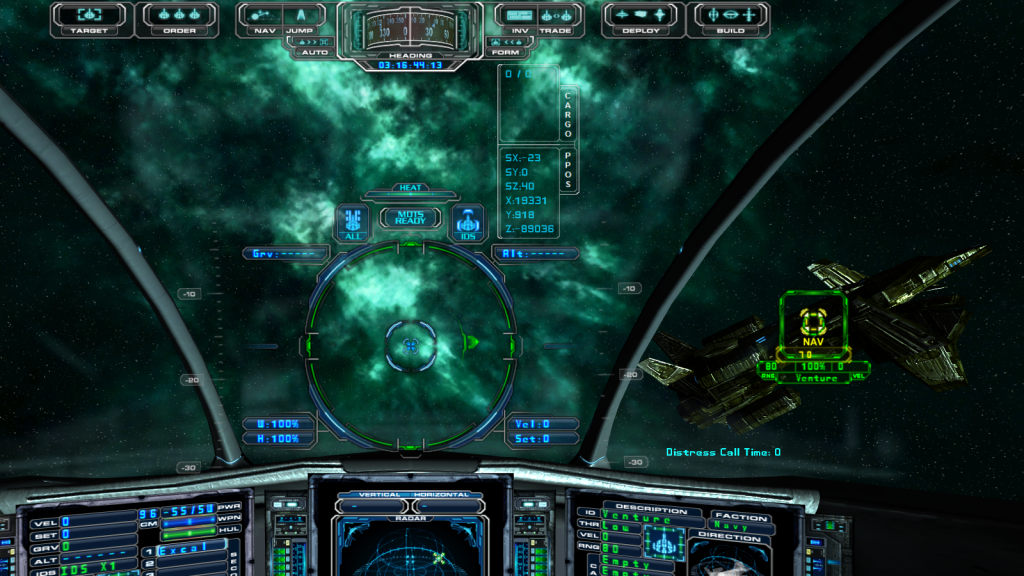
I don't think you'll find planet names. The best I could come up with can be seen in this screenshot:
[align=center][img=864x486]http://img.photobucket.com/albums/v97/p ... 8af24b.png[/img][/align]
[align=center][img=864x486]http://img.photobucket.com/albums/v97/p ... 8af24b.png[/img][/align]
-
JDI
- Ensign
- Posts: 9
- Joined: Mon Dec 30, 2013 1:14 pm
- Location: Scotland
Panic Over
Hi Marvin,From post: 166603, Topic: tid=11174, author=Marvin wrote:I don't think you'll find planet names. The best I could come up with can be seen in this screenshot:
[align=center][/align]
That's the same info that I have displayed at the moment. What I would like to add is the system name.

-
Marvin
- Global Moderator
- Posts: 14373
- Joined: Wed Mar 04, 2009 5:47 am
- Location: Fallon-Reno
Panic Over
Currently, all the HUD values are numerical. The savedatasettings file does relay the system name ... but that file is only used in 3rd party programs (like Travel Buddy ... which can be displayed on the same screen as the game ... tucked into an out-of-the-way corner).
-
JDI
- Ensign
- Posts: 9
- Joined: Mon Dec 30, 2013 1:14 pm
- Location: Scotland
Panic Over
Hi Marvin,From post: 166606, Topic: tid=11174, author=Marvin wrote:Currently, all the HUD values are numerical. The savedatasettings file does relay the system name ... but that file is only used in 3rd party programs (like Travel Buddy ... which can be displayed on the same screen as the game ... tucked into an out-of-the-way corner).
Thanks for your patience and all the info :-)
Do you have the source code for Travel Buddy ?
-
Marvin
- Global Moderator
- Posts: 14373
- Joined: Wed Mar 04, 2009 5:47 am
- Location: Fallon-Reno
Panic Over
Yes, but the package comes to 410 KB ... too big to post here. Perhaps I can pass it along to SeeJay for posting at his website.
-
SeeJay

- Captain
- Posts: 3507
- Joined: Wed Aug 11, 2010 9:03 am
- Location: Sweden
Panic Over
That works for me, just send it through normalFrom post: 166621, Topic: tid=11174, author=Marvin wrote:Yes, but the package comes to 410 KB ... too big to post here. Perhaps I can pass it along to SeeJay for posting at his website.
secure channels! ;-)
\"Nothing is impossible, it only takes a bit longer!\"
\"We are not retreating, we are advancing in another direction!\"
http://evochron.junholt.se (Old)
http://www.evochron2.junholt.se (New)
http://mercenary.junholt.se (Map)
http://www.junholt.se/evoschool/index.htm (No spoilers)
-8- Bzzzzzzzzz! -8- -8-
\"We are not retreating, we are advancing in another direction!\"
http://evochron.junholt.se (Old)
http://www.evochron2.junholt.se (New)
http://mercenary.junholt.se (Map)
http://www.junholt.se/evoschool/index.htm (No spoilers)
-8- Bzzzzzzzzz! -8- -8-
-
JDI
- Ensign
- Posts: 9
- Joined: Mon Dec 30, 2013 1:14 pm
- Location: Scotland
Panic Over
Looking forward to downloading the package.From post: 166623, Topic: tid=11174, author=SeeJay wrote:That works for me, just send it through normalFrom post: 166621, Topic: tid=11174, author=Marvin wrote:Yes, but the package comes to 410 KB ... too big to post here. Perhaps I can pass it along to SeeJay for posting at his website.
secure channels! ;-)
Many thanks guys
-
Marvin
- Global Moderator
- Posts: 14373
- Joined: Wed Mar 04, 2009 5:47 am
- Location: Fallon-Reno
Panic Over
 I need to make adjustments to the correction factor ... which I will do tomorrow ... if G1 is up and running.
-
JDI
- Ensign
- Posts: 9
- Joined: Mon Dec 30, 2013 1:14 pm
- Location: Scotland
Panic Over
Hi Guys,
I decided to have a go at it myself.
So I fired up VB and messed around a bit.
The end result is a transparent, borderless form that reads and displays the current system you are in from the savedata file every 8 seconds.
I have it sitting just below the HUD navigation globe and it works just fine.
The next step will be to have it read my maplog file and alert me if the system I've just entered hasn't been logged by me yet.
Cheers
JDI
I decided to have a go at it myself.
So I fired up VB and messed around a bit.
The end result is a transparent, borderless form that reads and displays the current system you are in from the savedata file every 8 seconds.
I have it sitting just below the HUD navigation globe and it works just fine.
The next step will be to have it read my maplog file and alert me if the system I've just entered hasn't been logged by me yet.
Cheers
JDI