

Hi, I'm a new player and I'm enjoying the game a lot. However navigation, especially long distance, gives me headaches in EM, because:
- in the navigation panel the X-axis is labelled <Y> and the Y-axis is labelled <X>
- distress calls, passengers and others don't specify in their coordinates whether it's sector or local coords
- likewise for coords in quadrant map
- there seems to be no easy way to set such coords as nav points. Do I really have to type it in? While the message log keeps scrolling out of view?
- How big is a quadrant? Apparently it's bigger than what I see at maximum zoom out level in the nav map?
- Can I set nav points outside my sector at all?
- zooming of the nav map is tedious, scrolling is only possible when zoomed in completely
- you can't zoom/scroll out of the sector
A few of these problems stem from the fact that even after playing for a few days the connection between quadrants and sectors isn't clear to me. And I put this down to the way these are handled separately in the nav panel.
Enlightening replies would be much appreciated.
Navigation problems
-
Vice

- Administrator

- Posts: 12227
- Joined: Fri Apr 25, 2003 1:38 am
Navigation problems
Hello and welcome. Sounds like you just haven't learned the navigation system yet. I'll try to answer each of your points and then I recommend you check out the navigation video tutorial at the link below.
Navigation Video Tutorial: https://www.youtube.com/watch?v=0ixVO-bVDXQ
Maybe this was mistyped? Did you mean 'not' labeled? X, Y, and Z is indicated in the highlight section and on the map, depending on the orientation you've selected.- in the navigation panel the X-axis is labelled and the Y-axis is labelled
Yes they do, but you'll need to learn the values represented. For distress calls, SX, SY, and SZ coordinates are 'sector' values, X, Y, and Z are in-sector coordinate values. For passengers, it's always sector coordinates since you always only have to transport them to the station in the sector specified.- distress calls, passengers and others don't specify in their coordinates whether it's sector or local coords
Quadrant maps always show only sector coordinates. In-sector coordinates aren't displayed there anyway since you wouldn't be able to read them, even zoomed in.- likewise for coords in quadrant map
Click on the map. Left click for an unbound nav target, right click to plot a nav target directly to an object with an icon on the map. You can also store nav points in the maplog for fast retrieval in the future. No, you don't have to type it in. Hold the mouse pointer over the message log and use the mouse wheel to scroll back through messages as desired. Or leave the mouse pointer over the message log control options to hold the messages in place so they don't scroll away.- there seems to be no easy way to set such coords as nav points. Do I really have to type it in? While the message log keeps scrolling out of view?
It is roughly 10,000SX X 10,000SZ sectors, although most solar systems are within about -3500 to +3500 SX and -3500 to +3500 SZ (or 7,000SX X 7,000SZ total sectors). The 'Evochron' Quadrant consists of the collection of sectors you see in the quadrant map. When you are in the sector detail mode, you are seeing everything within those sector cubes. The video below will explain this 3D map formatting in detail.- How big is a quadrant? Apparently it's bigger than what I see at maximum zoom out level in the nav map?
Yes. Zoom out (mouse wheel is easiest), locate any sector within nav scanner range, right click to zoom in on a sector, then plot your nav point.- Can I set nav points outside my sector at all?
Only when using the scroll mode, which is pretty slow and tedious, but players wanted it added at least as an option. Better to use mouse wheel zoom and right click to snap zoom to other sectors much faster.- zooming of the nav map is tedious, scrolling is only possible when zoomed in completely
See above and below. I can also provide a comparison video for you if you like, showing how the snap zoom system works compared to the zoomed in scrolling method. But you'll likely find the snap zoom option to be superior and once learned, the preferred way to plot nav points.- you can't zoom/scroll out of the sector
Navigation Video Tutorial: https://www.youtube.com/watch?v=0ixVO-bVDXQ
-
DaveK

- Global Moderator

- Posts: 4161
- Joined: Mon Apr 19, 2010 9:04 pm
- Location: Leeds UK
Navigation problems
There is a comprehensive pdf version of a Hints and Tips Guide available from SeeJay's website.
It has hints, tips, tutorials and spoilers collected from the community including a chapter on navigation but . . .
beware of the many spoilers in some of the sections!

[Edited on 27-11-2013 by DaveK]
It has hints, tips, tutorials and spoilers collected from the community including a chapter on navigation but . . .
beware of the many spoilers in some of the sections!
[Edited on 27-11-2013 by DaveK]
Callsign: Incoming

Life is like a sewer... what you get out of it depends on what you put into it. - Bob Newhart
Hell is being in a pure platinum asteroid field... with a diamond mining beam


Life is like a sewer... what you get out of it depends on what you put into it. - Bob Newhart
Hell is being in a pure platinum asteroid field... with a diamond mining beam
-
Marvin

- Global Moderator
- Posts: 14373
- Joined: Wed Mar 04, 2009 5:47 am
- Location: Fallon-Reno
Navigation problems
 There's also this: http://www.starwraith.com/forum/viewtop ... #pid150452
-
Kolya
- Ensign

- Posts: 10
- Joined: Wed Nov 27, 2013 8:47 am
Navigation problems
Thanks to you both. A few things have become clearer and I'm sure even more will when I've consumed the docu.
It seems the forum mistook parts of my post for HTML tags and ate it. The first point in my list was actually supposed to read:
"- in the navigation panel the X-axis is labelled Y and the Y-axis is labelled X"
This had completely stumped me in the beginning. Usually a coordinate system looks like this: http://www.functionx.com/images/point1.gif
The nav map works the same way, but the X is on the top and the Y is on the left. I understand now that you're actually labelling the sides and not the axis, but the presentation is ambiguous and counter-intuitive.
About passengers and the quadrant map: If their coords are always sector coordinates, why don't they have SX,SY,SZ in front? It's confusing enough to newbies like myself that there are two types of coordinates, but when you don't use the naming convention you made up for them, it gets worse.
None of this is impossible to understand given enough time, but it makes getting into the game unnecessarily hard.
When I asked about a simple way to set nav points from passenger info or from distress calls, I was thinking about something like their coords being a simple link, that I can click and have the nav point set automatically.
It doesn't seem to help that I can freely click around in the map or rightclick objects, when I need a nav point at a specific location that's only given in text. So I end up typing it in, which is the fastest way but of course error prone and tedious.
And it seems to be the only way to place a nav point in a far away sector. Even when zoomed out completely while stationed at Sapphire I can't place a nav point at Pices for example. The space I see is confined. And the distance to Pices isn't clear to me because there's no seamless visual representation. Either I see the confined nav map or the quadrant map. It seems I have to calculate the distance in my head.
[Edited on 28-11-2013 by Kolya]
[Edited on 28-11-2013 by Kolya]
[Edited on 28-11-2013 by Kolya]
It seems the forum mistook parts of my post for HTML tags and ate it. The first point in my list was actually supposed to read:
"- in the navigation panel the X-axis is labelled Y and the Y-axis is labelled X"
This had completely stumped me in the beginning. Usually a coordinate system looks like this: http://www.functionx.com/images/point1.gif
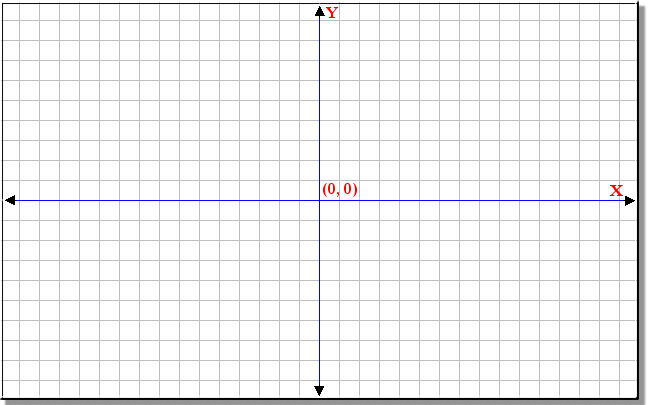
The nav map works the same way, but the X is on the top and the Y is on the left. I understand now that you're actually labelling the sides and not the axis, but the presentation is ambiguous and counter-intuitive.
About passengers and the quadrant map: If their coords are always sector coordinates, why don't they have SX,SY,SZ in front? It's confusing enough to newbies like myself that there are two types of coordinates, but when you don't use the naming convention you made up for them, it gets worse.
None of this is impossible to understand given enough time, but it makes getting into the game unnecessarily hard.
When I asked about a simple way to set nav points from passenger info or from distress calls, I was thinking about something like their coords being a simple link, that I can click and have the nav point set automatically.
It doesn't seem to help that I can freely click around in the map or rightclick objects, when I need a nav point at a specific location that's only given in text. So I end up typing it in, which is the fastest way but of course error prone and tedious.
And it seems to be the only way to place a nav point in a far away sector. Even when zoomed out completely while stationed at Sapphire I can't place a nav point at Pices for example. The space I see is confined. And the distance to Pices isn't clear to me because there's no seamless visual representation. Either I see the confined nav map or the quadrant map. It seems I have to calculate the distance in my head.
[Edited on 28-11-2013 by Kolya]
[Edited on 28-11-2013 by Kolya]
[Edited on 28-11-2013 by Kolya]
-
Vice
- Administrator
- Posts: 12227
- Joined: Fri Apr 25, 2003 1:38 am
Navigation problems
Ok, that makes more sense. Yes, the X label is at the top on the X center line, with arrows pointing left and right indicating direction -/+, rather than having it on the Z/Y dividing line trying to indicate the same thing, which would likely confuse others also. Likewise with Z and Y on their center line with arrows pointing up and down indicating directional negative and positive, rather than trying to show this on the opposing X center line. This is merely a design decision for clarity, which may not be as clear for you, but has been for others. It may not match modern graph paper charts, but it exists in this format (each on its own center-line and not on the opposing coordinate center line) for a reason.It seems the forum mistook parts of my post for HTML tags and ate it. The first point in my list was actually supposed to read:
"- in the navigation panel the X-axis is labelled Y and the Y-axis is labelled X"
Character space availability mostly for those that don't (although this may not be as much of a factor with the new font as it used to be). But as I said, distress calls do, because they require both sets. You raise a good point though on passengers which just direct the player to transport the person to the location. I'm surprised it hasn't come up before. Has me curious on this one, I'll see if the additional 9 characters or so will fit in that line.About passengers and the quadrant map: If their coords are always sector coordinates, why don't they have SX,SY,SZ in front?
It could do that, but it would be useless... you'd never get there in time if you flew there directly with the jump drive, space is too big. Part of the challenge of these alerts is having to plot your course to get there, not having the computer do it all for you. So this means you'll need to plot your trajectory manually through jump gates and coordinates to arrive at the required point. The calls are usually in systems many sectors away and can't be reached by a few hops with the jump drive.When I asked about a simple way to set nav points from passenger info or from distress calls, I was thinking about something like their coords being a simple link, that I can click and have the nav point set automatically.
Yes, I would not recommend manually typing things in, it's better to do it visually. Some players still likely to be able to type things in and/or fine tune a visual selection by changing values via the keyboard, but it's not required. Probably just a matter of getting used to handling things visually on the map, learning the trade/travel routes, and selecting the gates/nav points to get there, rather than trying to manage it by manual entry.It doesn't seem to help that I can freely click around in the map or rightclick objects, when I need a nav point at a specific location that's only given in text. So I end up typing it in, which is the fastest way but of course error prone and tedious.
What would be your goal to do so? You don't need to plot sector jumps that far out to get to Pices, unless you like really, really, -really- long waits to get from A to B by trying to jump there manually. You'll want to learn to use the gate network to travel around from system to system and that is available to you locally. Hold the mouse pointer over a gate (purple icons on the map) to retrieve the travel details for that gate. You'll quickly learn how to move around this way after a few trips.And it seems to be the only way to place a nav point in a far away sector. Even when zoomed out completely while stationed at Sapphire I can't place a nav point at Pices for example. The space I see is confined. And the distance to Pices isn't clear to me because there's no seamless visual representation. Either I see the confined nav map or the quadrant map. It seems I have to calculate the distance in my head.
Technically, I could probably add the ability to plot sector nav points on the quadrant map, but it would generally only be helpful for gauging direct distance and not for actual travel paths, gates, actual time to get there, etc.
-
SeeJay

- Captain

- Posts: 3507
- Joined: Wed Aug 11, 2010 9:03 am
- Location: Sweden
Navigation problems
Hi and welcome.
I can understand your frustration regarding the Nav System. What many pilots have a hard time grasping is the 3D aspect of space.
The map image you published above is true in Mercenary as well.
The X-Axis is "West (-) / East (+).
The Y-Axis is down (-) / Up (+) [Use Reverse angle to see the Y-Axis]
The Z-Axis is South (-) / North (+)
Many pilots mix up the Y and Z axis. In math (at school) we normally use X and Y axis since it's normally only 2D charts. Even here the Y-axis is Up/Down, Not North / South.
Don't know if this makes any sense to you but I thought I make a shot at it.
Regarding plotting a nav point far away is completely useless if you plan to use jump-gates.
You can only "program" one nav point to your Autopilot, not a complete route. That would be very cool tho if that feature was implemented.
Hope you get your head around it.
See ya out there, SeeJay
I can understand your frustration regarding the Nav System. What many pilots have a hard time grasping is the 3D aspect of space.
The map image you published above is true in Mercenary as well.
The X-Axis is "West (-) / East (+).
The Y-Axis is down (-) / Up (+) [Use Reverse angle to see the Y-Axis]
The Z-Axis is South (-) / North (+)
Many pilots mix up the Y and Z axis. In math (at school) we normally use X and Y axis since it's normally only 2D charts. Even here the Y-axis is Up/Down, Not North / South.
Don't know if this makes any sense to you but I thought I make a shot at it.
Regarding plotting a nav point far away is completely useless if you plan to use jump-gates.
You can only "program" one nav point to your Autopilot, not a complete route. That would be very cool tho if that feature was implemented.
Hope you get your head around it.
See ya out there, SeeJay
\"Nothing is impossible, it only takes a bit longer!\"
\"We are not retreating, we are advancing in another direction!\"
http://evochron.junholt.se (Old)
http://www.evochron2.junholt.se (New)
http://mercenary.junholt.se (Map)
http://www.junholt.se/evoschool/index.htm (No spoilers)
-8- Bzzzzzzzzz! -8- -8-
\"We are not retreating, we are advancing in another direction!\"
http://evochron.junholt.se (Old)
http://www.evochron2.junholt.se (New)
http://mercenary.junholt.se (Map)
http://www.junholt.se/evoschool/index.htm (No spoilers)
-8- Bzzzzzzzzz! -8- -8-
-
Kolya
- Ensign
- Posts: 10
- Joined: Wed Nov 27, 2013 8:47 am
Navigation problems
Thank you for the explanations, it's appreciated that you put up with this newbie's frustrations and questions.
I understand now that plotting a nav point to a far away system is mostly useless and I should use jump gates instead. The way I learned this was when I tried to jump/fly to a neighbouring system that looked very close on the quadrant map, but turned out to be impossible to reach by 5-sector jumps. I just wish I had known this before. A map that could seamlessly zoom out from sector view into quadrant view would have helped here.
I want to say another thing though that hopefully will put my bickering into perspective: I bought EM and XRebirth the same week. Now XRebirth is a game that's broken in a million ways, but even if it all would work Evochron Mercenary is still more enjoyable and fills the role of what I expect from a space sim much better. That's why I'm here, talking about my navigation problems. Again, thanks for putting up with it.
I understand now that plotting a nav point to a far away system is mostly useless and I should use jump gates instead. The way I learned this was when I tried to jump/fly to a neighbouring system that looked very close on the quadrant map, but turned out to be impossible to reach by 5-sector jumps. I just wish I had known this before. A map that could seamlessly zoom out from sector view into quadrant view would have helped here.
I want to say another thing though that hopefully will put my bickering into perspective: I bought EM and XRebirth the same week. Now XRebirth is a game that's broken in a million ways, but even if it all would work Evochron Mercenary is still more enjoyable and fills the role of what I expect from a space sim much better. That's why I'm here, talking about my navigation problems. Again, thanks for putting up with it.
-
DaveK
- Global Moderator
- Posts: 4161
- Joined: Mon Apr 19, 2010 9:04 pm
- Location: Leeds UK
Navigation problems
Like you I was frustrated and spent more time flitting around to wrong places than doing what I really wanted to do. 
I know it may not help immediately because you are finding the nav system a steep learning curve, but my experience was . . . I grumbled on the forum, on MP and took all the advice I could get. Fairly quickly it started to 'click' and withing a few play hours I was getting from one side of the Evoverse to a tiny target at the other side in minutes - Once I'd learned where the system gates were so I could open the nav map and know where to click to target the correct one, I can get from Agate Hub to Deneb in a couple of minutes (real time)
So read, think, persevere a bit and it will make sense - very few players have ever said that they found the nav system to be intuitive, but several extended discussion threads from 'Evochron Legends' onward (that's the width of my experience) have helped Vice to fine tune the nav system to what we've got
Marvin has created a good, clear, illustrated, guide to navigation - it's on the forum and in the H&TGuide
With respect to X, Y, Z - if you have a technical, engineering or science background it initially looks 'wrong'. On a 2D plane we expect Y you be top <-> bottom and X to be left <-> right. But the Evoverse is 3D (more so in the latest version with systems well above and below the Galactic Plane!) vertically up and down (ie above and below of the Galactic Plane should be and is the Y axis.
Treat the nav map as a sheet looking down at the galactic plane and tilt it up from the table to a vertical pinboard . . . .X is (as we expect) L<->R but the top<->bottom of the map is actually mapping the front<->back of Evoverse cube and hence is (as expected) the Z coordinate!
I guess it's a Human tendency to want to look top down on the Galaxy rather than edge on (which is how we see it from Earth as the Milky Way).
I know it may not help immediately because you are finding the nav system a steep learning curve, but my experience was . . . I grumbled on the forum, on MP and took all the advice I could get. Fairly quickly it started to 'click' and withing a few play hours I was getting from one side of the Evoverse to a tiny target at the other side in minutes - Once I'd learned where the system gates were so I could open the nav map and know where to click to target the correct one, I can get from Agate Hub to Deneb in a couple of minutes (real time)
So read, think, persevere a bit and it will make sense - very few players have ever said that they found the nav system to be intuitive, but several extended discussion threads from 'Evochron Legends' onward (that's the width of my experience) have helped Vice to fine tune the nav system to what we've got
Marvin has created a good, clear, illustrated, guide to navigation - it's on the forum and in the H&TGuide
With respect to X, Y, Z - if you have a technical, engineering or science background it initially looks 'wrong'. On a 2D plane we expect Y you be top <-> bottom and X to be left <-> right. But the Evoverse is 3D (more so in the latest version with systems well above and below the Galactic Plane!) vertically up and down (ie above and below of the Galactic Plane should be and is the Y axis.
Treat the nav map as a sheet looking down at the galactic plane and tilt it up from the table to a vertical pinboard . . . .X is (as we expect) L<->R but the top<->bottom of the map is actually mapping the front<->back of Evoverse cube and hence is (as expected) the Z coordinate!
I guess it's a Human tendency to want to look top down on the Galaxy rather than edge on (which is how we see it from Earth as the Milky Way).
Callsign: Incoming
Life is like a sewer... what you get out of it depends on what you put into it. - Bob Newhart
Hell is being in a pure platinum asteroid field... with a diamond mining beam
Life is like a sewer... what you get out of it depends on what you put into it. - Bob Newhart
Hell is being in a pure platinum asteroid field... with a diamond mining beam
-
Marvin
- Global Moderator
- Posts: 14373
- Joined: Wed Mar 04, 2009 5:47 am
- Location: Fallon-Reno
Navigation problems
From post: 165523, Topic: tid=11090, author=Kolya wrote:It seems I have to calculate the distance in my head.
From H2GE:
Travel Buddy
The H2GE Travel Buddy is a must-have accessory for every pilot who dreams of exploring beyond the confines of gated space. Manufactured by the same people who brought you laboratory robots, the Travel Buddy is compact and simple to operate yet affords a degree of confidence and worry-free travel previously unavailable to the average mercenary.
[align=center]
The H2GE Travel Buddy[/align]
Once engaged, the Travel Buddy constantly reminds you to make or maintain the proper energy and power settings. It monitors your progress across space, be it short hops or vast distances, and provides information on: (1) current fuel requirements, (2) distance to jump point and/or destination, (3) time en route. It even compensates for type jump drive, be it a C2 Fulcrum, an experimental Mantis, or anything in between.
Months is development, the H2GE Travel Buddy is, when used in conjunction with ship's autopilot and operated IAW manufacturer's specifications, accurate* to within sixty seconds of jump time.
* Fluctuations in fuel flow can vary and he who ignores the slop indicator (+/-) is probably courting disaster (see entry on distress calls). Admittedly, fuel requirements will probably never exceed the amount of slop displayed. Nonetheless, it's always best to err on the side of caution: top off your fuel tank before every long trip and insure that both your subspace radio and CHAT are in good working order.
You can download an operable version at SeeJay's new website.-
Marvin
- Global Moderator
- Posts: 14373
- Joined: Wed Mar 04, 2009 5:47 am
- Location: Fallon-Reno
Navigation problems
P.S. After you enter destination coordinates into the Nav Map windows, check your HUD. Underneath the NAV indicator, you'll see the total distance displayed.