just bought Evochron

Tips, tactics, and general discussion for Evochron Legacy.
twisted
Ensign
Ensign
Posts: 5
Joined: Sun Dec 16, 2012 5:26 am

just bought Evochron

Post by twisted »

Hi. Am a space sim fan who has been suffering with the lack of new game variety out there. Then i discovered EM on steam. Tried the demo. digged it big time and bought the game.

totally enjoying it. Truth to say there are times when its hard to know what going on at first. the ingame tutorials are v good and the fan tutorial for mercs first mission is what made me realise there actually is a first mission.

but the ship handling, space feel and customisation are amazing.

There are a few questions i'd like to ask as a proud new EM owner. these questions are things i keep trying to do but cannot figure out.

1. How can i make Alt down the default ship state (interacting with icons on screen) and pressing alt or something else to activate ship move mode.

2. How can i select stations?

3. how i can i select next mission waypoint? i keep losing it.

4. how can i set ctrl+j as jump? i keep losing missions because of my clumsy digits.

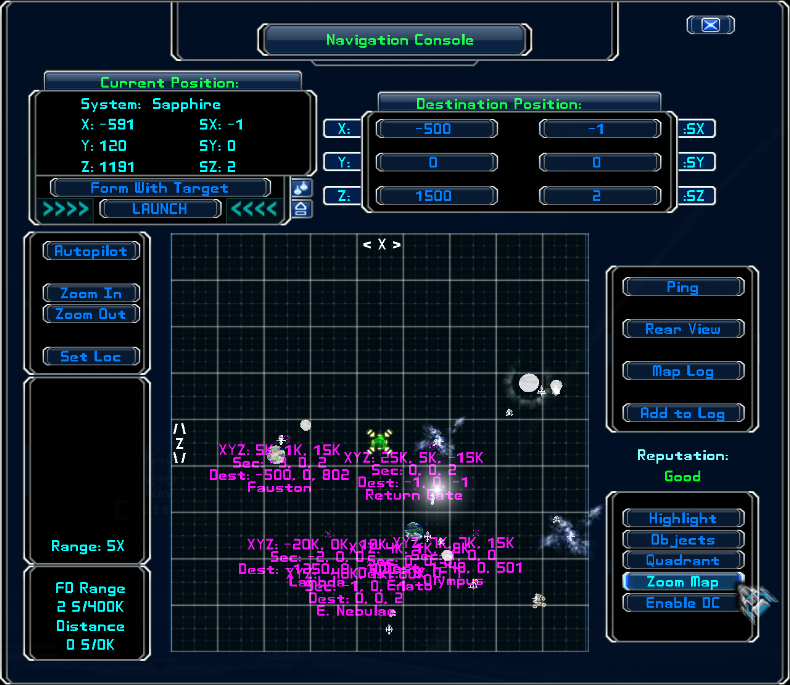
5. Any mods for the ingame navigation system? it's basic but good. hoping there are system upgrades that my pilot will stumble upon... have also seen the amazing out of game mods - but they have big spoilers for adventurers and i was wondering if the actual in game system has been made open to be modded by players. be amazing if there were as information and navigation are the real power.

6. is there a free look option - for example hold aly and can look freely like trackir will let you but using mouse?

7. is there an auto save on dock feature i havent found?

8. Is there purpose to the AI or are they all tandom? will there be mass movements to lowered priced places or always the simple generic action i have experience so far after 1 tiny 1 hour and 80 minutes. ;)


really dig the game and pleased with my purchase.. just these few things i keep trying to figure out how to do.
Julius
Ensign
Ensign
Posts: 14
Joined: Sun Aug 05, 2012 3:32 am

just bought Evochron

Post by Julius »

Welcome to the forums!

1. ALT down, I do not think I understand the question

2. Right click them on the map

3. The waypoint is automatically selected when you accept a mission. Do not use the HUD menu to jump use the defult F2 key (or change it to another key away from the often used F1 and F3 keys like F12). Holding down Alt and pressing jump jumps you your full jump range at the direction you are facing (good for getting out of difficult situations, but not good to get to a way point)

4. I just use F12 and it is far enough away from other used keys that it works for me. Not sure if you can create custom key commands with a modifier, I have never tried it. Due to the fact that the Jump as far as you can in the direction you are facing command is the jump command +alt you might not be able to use a key with a modifier for that command.

5. There is one that I have never tried that links your ship position with a third party map.

6. not sure

7. not that I know of, but some actions do auto save (like getting something or putting something into the storage)

8. The answer is kind of in the middle. Some will try to trade with you, or attack you, they can now give you news if you communicate with them.

I highly suggest you play multiplayer, other than a few options being different, the game is the same, except you are flying with some human players. Many players play multi player elusively and PVP is one of the best things about this game.
Image
k0rd
Ensign
Ensign
Posts: 8
Joined: Wed Dec 05, 2012 12:21 am

just bought Evochron

Post by k0rd »

6. press f10

( i think that's what you are looking for - found it myself on accident once )
User avatar
Marvin
Global Moderator
Global Moderator
Posts: 14373
Joined: Wed Mar 04, 2009 5:47 am
Location: Fallon-Reno

just bought Evochron

Post by Marvin »

5. If you create a savedata file, you can import the data to a stand-alone program. I use the data to tell me how long it will take to get from my PPOS to whatever destination I have set and how much fuel I'll burn for the trip. As for information, ask an AI ... it will probably cost you and you won't always get useful information but sometimes the information is quite good.
Maarschalk
Captain
Captain
Posts: 7641
Joined: Wed Feb 25, 2009 12:24 am
Location: USA, Also check your six!

just bought Evochron

Post by Maarschalk »

Hi Twisted, welcome to the game and forum!.....Hope to see you out there some time!.....;):cool:
Arvoch Alliance Stat:


Evochron Legends Stats:


Evochron Mercenary Stats:


Darkness is the absence of Light as Evil is the absence of Good
User avatar
SeeJay
Captain
Captain
Posts: 3507
Joined: Wed Aug 11, 2010 9:03 am
Location: Sweden

just bought Evochron

Post by SeeJay »

Hi and welcome!;)
\"Nothing is impossible, it only takes a bit longer!\"
\"We are not retreating, we are advancing in another direction!\"


http://evochron.junholt.se (Old)
http://www.evochron2.junholt.se (New)
http://mercenary.junholt.se (Map)
http://www.junholt.se/evoschool/index.htm (No spoilers)
-8- Bzzzzzzzzz! -8- -8-
Image
twisted
Ensign
Ensign
Posts: 5
Joined: Sun Dec 16, 2012 5:26 am

just bought Evochron

Post by twisted »

thanks! very cool, welcoming community. look forward to flying with you all.


i really would be interested in the navigation element modification, but let me get to know this community better.


[Edited on 18-12-2012 by twisted]
User avatar
Marvin
Global Moderator
Global Moderator
Posts: 14373
Joined: Wed Mar 04, 2009 5:47 am
Location: Fallon-Reno

just bought Evochron

Post by Marvin »

:cool: The navigator's HUD:

Image

;) And step-by-step instructions on how to use the Navigation Console: http://www.starwraith.com/forum/viewtop ... #pid150452
twisted
Ensign
Ensign
Posts: 5
Joined: Sun Dec 16, 2012 5:26 am

just bought Evochron

Post by twisted »

thanks, that guide is nice. and do you mean nav console which can be reached by cycling through the HUDs? it helps but the auto lock of targets, primary action of steering rathering than being able to select/click on things and then images like http://img.photobucket.com/albums/v97/p ... ure23a.png
when going to nav map make it difficult.

thing is i am enjoying the game so i will endeavour to adapt, but there could be awesome interacting with the universe where the struggle is surving rather than trying to figure out how a nav's Idiosyncrasies work
User avatar
Marvin
Global Moderator
Global Moderator
Posts: 14373
Joined: Wed Mar 04, 2009 5:47 am
Location: Fallon-Reno

just bought Evochron

Post by Marvin »

:cool: Once you get used to what looks like a complicated nav map ... you'll be easily using it to cross hundreds of sectors ... with or without icons.
Busch
Captain
Captain
Posts: 1468
Joined: Tue Jul 20, 2010 1:07 am
Location: Portland, OR. West Coast, USA

just bought Evochron

Post by Busch »

F-10 is the "mouse-look" toggle, keyboard hot-key...y'all. Then there's the slider option for the Nav console/Nav map views and certain navigation options, that's new with Mercs Deuce (2.XX iterations). Pressing/toggling F-1 opens the Nav console, or tapping/left-clcking the "NAV" button at top-of-HUD header will give you the same action. Then there's the education and familiarization schtick that ALL pilots in the Evo-verse have experienced, and will continue experience/sustain at regular intervals. For some, (like me - still !) the learning "curve" can be quite steep, if not absolutely Alpinic! Hang in there! The more you know and understand about how "things" work here, the better you'll perform. One may say the same about other topics of discussion, even real-life stuffage! As with much else - practice, practice, practice!

Welcome aboard, Twisted! Hope to see y'all out there some time! :) :cool::cool:

P.S.: Almost forgot this one. There are three pages of key assignments in the "Configure Controls/Keyboard-Mouse" panel from the "Options" menu, in-game. Most are scaleable, some aren't. Some are "game-breakers" if'n ye meddle with it. You'll have to go in there to find which are those you can alternatively assign.

[Edited on 12-22-2012 by Busch]
Commander
Image
[SW] Clan Squadron Lead - Retired
Call Sign: Busch
Image
Image
tranx
Ensign
Ensign
Posts: 2
Joined: Thu Jan 03, 2013 9:43 pm

just bought Evochron

Post by tranx »

Hi. I started with a mining ship and scooped 2x25 water from the planet and bought 21 food to get ready for the next emergency (apparently usually requiring 25units which is the limit for one of my 3 cargo bays) but now can't buy just 4 food if, say, 15 units are on offer. How can i get round this please?
User avatar
Vice
Administrator
Administrator
Posts: 12227
Joined: Fri Apr 25, 2003 1:38 am

just bought Evochron

Post by Vice »

Simply right click on food available for sale to buy 1 unit at a time instead of the entire set.
StarWraith 3D Games
www.starwraith.com | www.spacecombat.org
3D Space Flight and Combat Simulations
tranx
Ensign
Ensign
Posts: 2
Joined: Thu Jan 03, 2013 9:43 pm

just bought Evochron

Post by tranx »

Thank you.

Aha...