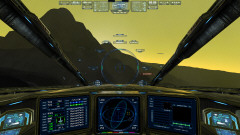
I am occasionally asked questions like this, so I' thought I'd provide some answers here for those interested. This post will also provide some basic information and links to helpful resources about the game. The game's website also provides some additional information.
Topic Quick Links:
1 - Gameplay
2 - Space Combat
3 - Building
4 - Miscellaneous Activities
5 - Gameplay Focus and Time Efficiency
6 - User Interface and Menus
7 - Navigation and Open Space Travel
8 - Heads-Up-Display and Combat Information Systems
9 - Interactive Universe
10 - Flight Simulation, Control, and Physics
11 - Unified Single Player and Multiplayer Gameplay and Save Game Architecture
12 - Open Direct IP and LAN Multiplayer
13 - Full Offline Single Player Support
14 - Customizability
15 - Evochron Legacy Demo
16 - What Evochron Is Not
17 - Future Support and Updates
18 - Distances and Velocities
19 - New Pilot Tips
20 - More Information and Resources
1 - Gameplay
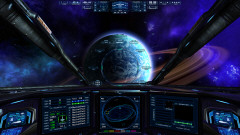
Evochron is a tightly focused technical open world 'flight' space-sim with options and gameplay specifically geared toward that design objective. As a technical space flight simulation, the game focuses on what flying and managing a spacecraft as a lone-wolf pilot might be like in the future. Evochron is about space -flight- and what it might theoretically be like to fly a small to medium sized spacecraft in the distant future through sparsely populated systems in a large region of the galaxy. If something doesn't relate to the player being in control and flying their spacecraft nearly 100% of the time they play, it won't likely be in the game.Available activities include computer arranged mission/contract objectives (more details on specific objectives below), player arranged objectives, player selected ship configurations, custom weapon designing, equipment crafting, and many elements of environmental exploration, flight physics nuances, and interaction. Even activities done inside stations and on the surface of planets will often ultimately be linked to effects and benefits applied to the player's ship and their management of it. So you can think of the game as more of a space flight-sim that is focused on the pilot and their skills at flying, combat, navigating, trade, and exploring along with their ability to expand their ship's capabilities in those areas, rather than anything else. Evochron's focus is on the elements of piloting spacecraft and the complexities, challenges, and rewards that go along with it while exploring a vast 'seamless' style universe in which you can fly to and interact with planets, moons, asteroids, and nebula clouds you see around you. The focus is on the simulation aspect of managing a complex spacecraft in the realm of space.
2 - Space Combat
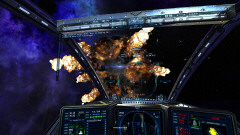
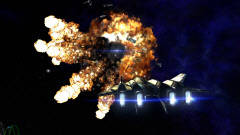
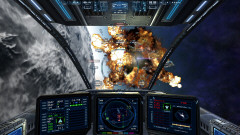
In conjunction with the space flight sim focus is combat. Evochron is also largely a space combat simulator, so you'll find much of its gameplay focuses on that objective as well. Since space combat inherently includes a player's ability to pilot their spacecraft, it has been given much of the gameplay focus. And that focus is done within the context of the game's detailed flight model and relatively complex control systems. So if you enjoy Newtonian style flight physics with complete six-way axis and rotation capabilities (6DOF with optional variable input controls) in addition to fairly complex weapon systems within the realm of space combat, then you may enjoy this game a lot. If you don't enjoy the challenge, complexity, and diversity such elements provide in the realm of space combat, this may not be the game for you.Complimenting the physics and control aspects of the game is an extensive array of additional unique elements to expand and specialize the ship you fly specifically for combat. Here is a list of some of the main categories, options, and items you can utilize for tactics and customizing your ship's design for combat with:
> Redirect Missiles in Flight - Missiles you fire stay connected to your ship's targeting system for selective redirection. If a ship you fire at is nearly destroyed and/or you want to prioritize attacking a different ship, you can change your current target with your missiles already in flight and they will be re-tasked to strike the new target you select. Likewise, if a hostile ship you have targeted is destroyed before your missiles reach it, your ship's targeting system and linked in-flight missiles will automatically switch to the next nearest hostile ship.
> Three Weapon Classes - Each with unique capabilities and optional applications. Particle Cannons for heavy impact damage and requires lead aiming. Beam Cannons for shield depletion and harmonized aiming at the speed of light. Secondaries include missiles, rockets, torpedoes, and rail cannon as well as some optional equipment.
> Modules - Devices mounted on a dedicated hardpoint to improve shielding, thruster performance, energy reserves, countermeasures against missiles, or reduce your ship's heat signature.
> Energy Cores - Directly improves power capacity for both energy weapons and shields.
> Hull Plating Types - Provides benefits in heat resistance, weapon resistance, repair efficiency, or weight reduction for improved agility.
> Armor Plating Layers - Improves protection against weapon impacts, both energy and missile based.
> Resistor Packs - Further improves protection against weapon impacts by diffusing delivered energy.
> Equipment - Several items can be installed on equipment hardpoints that improve the firing rate of your main cannons, provide additional charging power between shots, and supply more energy to shields as well as offer defensive benefits such as antimissile protection and automatic CM launching.
> Base Frame - The frame you start with can come with its own unique combat capabilities including agility, armor, energy reserves, and hardpoint capacities.
> Countermeasure Capacity - When selecting parameters for your ship (Frame Config menu), you can specify the number of countermeasures your ship is able to hold.
> Engine - Civilian ship designs allow you to install better engines for improved acceleration and top speed performance.
> Wing and Thruster Set - Civilian ship designs also allow you to select a wing and thruster combination to improve agility.
> Stealth Devices - Both a generator and a hardpoint installed device are available that can mask your ship from both visual and radar detection. One is reusable and depends on your ship's shield arrays to project a cloaking field while the other supplies its own cloaking field emitters, but is exhausted after one use and new ones must be installed for additional cloaking.
> 3D and 2D Radar Tracking of Targets - Two radar modes help provide an expanded perspective of the ships and objects around you. One is ideal for relative direction and basic range information while the other for more precise heading and distance.
> Comprehensive Target Tracking for Optimal Situational Awareness - Simultaneous HUD tracking of all targets in range with descriptions and threat levels. Visual tracking of such ships is provided in addition to a selected prioritized target.
> Advanced Missile Tracking and Evasion Systems - Missiles track the heat generated by your ship which can be monitored with a meter directly on the HUD to gauge your vulnerability at any given time. Counter-thermal defensive options are available to reduce your heat signature and make it more difficult for missiles to track you while using countermeasures. Individual arrows on the gunsight help indicate the direction and range of inbound missiles.
3 - Building
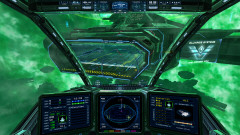
Another significant gameplay element is station and city building. The building system is primarily designed to be an option for facilitating the expansion of one of the two main faction's control in various regions of space. The focus is on building resource centers that can be used to equip, repair, reload, refuel, rearm, resupply, design (weapons and equipment), store ships/items, and bring in reinforcements. These benefits are a way to further a faction's cause in the large scope war effort condition presented in the game. So station and city structures primarily function more overall as forts rather than convenience stores. All station and city structures in the game, including default ones, are destructible and can be replaced by new ones built by the player. However, building can also be used to place important resource points in exploration if a player ventures out into uncharted space and/or wants to expand their faction's control in those areas as well. With the introduction of version 2.0418, stations can also optionally provide modest repeating payments to a player that builds a station command module or purchases a license from one. Here is a brief summary of some of the key benefits of building:- Increase technology levels (expands inventories)
- Storage centers at new locations
- Shipyards at new locations (where ship availability is based on tech/econ level)
- Weapon and engineering labs (placement can determine availability of components)
- New trade locations to expand the available network
- New repair and resupply centers
- Territory expansion for faction (including eventual reinforcement support)
- Safe zone for any of the above (when built with weapon turrets)
- New contract availability points
- Deep space exploration support
Building can also be used in other elements of gameplay. For one example, you scan the surface of a planet in sections, locate a hotspot with higher value materials, then build a city next to it where you can more easily mine and sell such valuable material more efficiently. And building in such a way can be done in conjunction with specific regions/sectors where such materials can be boosted further in value. Hence, building can also be combined with elements of item acquisition, planetary surface exploration, mining, trade/market considerations, and resource management.
Building also includes deploying optional temporary structures, which are designed to operate for short periods of time with their own temporary power supplies to sustain their operation for just the immediate session, location, and deployment. They will only remain present as long as a link to a/the player is maintained and/or they complete their operation. Such deployable structures include a mining probe, hangar/repair/sensor stations, fuel processor, shield array, and jump caster.
4 - Miscellaneous Activities
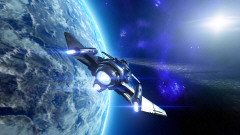
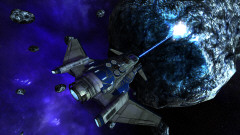
Within the primary space flight simulation framework are numerous gameplay options and activities available to the player. These include racing, spying, mining, trading, commodity shipping, escorting, combat (both in civilian space and military war zones), exploring (shipwrecks, data drives, discovering new uncharted systems, etc), asteroid clearing, solar equipment cleaning, emergency distress call response, equipment crafting, weapon crafting, crew management, station/city building, and ship designing. There are many ways to make money and advance in the game within the main context of space flight simulation.Some contract types and activities only become available once your ship has the needed equipment and/or you travel to certain locations with specific environmental features or territorial conditions. For some examples, military spacecraft are only available in war zones, embargo enforcement (intercepting smuggler) contracts are only available once you have a cargo scanner installed on your ship, satellite placement contracts are only available on planets, long range scanning objectives are only available when a deploy constructor is installed on your ship, meteor intercept distress calls are only available in sectors that have asteroid fields near planets, ship repair distress calls will only be available when you have a repair beam installed on your ship, and more. So as you branch out and achieve/acquire/travel more in the game's universe, new gameplay options and opportunities can become available.
5 - Gameplay Focus and Time Efficiency
Evochron is designed to be a 'get-to-the-point' space flight simulation and combat game. Contracts/jobs/missions are available in one common menu (within the inventory console), they can be reviewed and selected with just a few clicks. Many of the objectives are designed to be local and quick to access. So you won't have to walk around on foot, travel through a slow docking procedure, or shuffle through layers of menus/lists to get to available objectives. Availability is immediate and waypoint accessibility kept in close proximity (in the same sector for local contracts). For players interested in more long-range objectives, there are also optional delivery, recovery, exploration/scanning, and incursion response objectives requiring travel to other sectors/systems. Long distance travelling in the game is also managed via point-to-point jump drives and a network of jump gates for quicker access. The building mechanisms also provide the option to construct 'jump casters' for long distance, one way trips.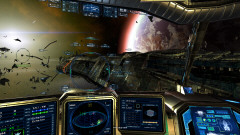
6 - User Interface and Menus
The user interface and menus are designed with a similar 'get-to-the-point' approach of efficiency and accessibility. Menus generally have all important functions available in one layer, rather than having to toggle through different levels of menu trees to get to important options. This does mean that there can be a lot of information and buttons on each menu display, but as you learn where things are, you'll likely find the fast one-click access to important options handy. Everything is also labelled and marked with clear click range frames so you can read text descriptions of what to click on and also know where to click.UI elements are also designed for the PC exclusively, so they include full mouse support for selecting options. The game features a toggle-free user interface utilizing direct point-n-click selection. Menu systems are designed to avoid repetitive 'highlight' toggling and excessive layering that slows down the selection process, obfuscates it, or hides common options under menu trees. Instead, options are generally available in one menu and directly selectable via mouse pointer. So you won't find a menu, or even parts of a menu, with options that require navigating with repetitive key or button presses... virtually everything in any menu is selectable via the mouse. And also within one or two clicks. So if you see an option on a menu, you can point to it directly with the mouse and select it. You don't have to toggle using arrow keys to move a highlight bar around until you eventually get to the option you want. Just point and click.
7 - Navigation and Open Space Travel
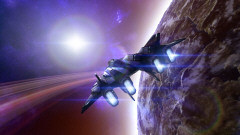
Evochron incorporates a full precision open space 3D navigation system with custom waypoint selection. Instead of forcing navigation through required 'doorways' (stars, gates, etc) for restricted travel routes to star systems, Evochron's navigation system uses variable and adjustable nav points for travel, contract waypoints, and object locations on a unified map interface. This lets you as the player precisely select where to go and what route to take for any location in space displayed on the nav map. You set the nav/jump point and can then travel exactly there. You also don't have to manage two separate menus for available objects-of-interest, everything is kept in a single nav map console menu that provides precise custom destination point selection. For example, if you want to arrive to the right side of a station, you can set a waypoint directly there, then engage the autopilot or jump drive to arrive exactly there (or optionally fly there manually at your own pace).The game's nav system also lets you store and retrieve custom points of interest, rather than being limited to only pre-generated static points of interest in a menu list. For example, if you find a hidden shipwreck or storage container, you can set a nav point to its location and then save it in your nav map log for future reference. Then if/when you want to return to that location, you can right click on its icon (or select it from the map log list) to quickly plot a nav point back to it.
In conjunction with the precision navigation system is the point-to-point jump drive. Following the design goal objective of 'get to the point' gameplay, the jump drive system in the game features a space folding point-to-point travel approach. This lets you quickly set a precise point to jump to without long wait times, risking a fly-by and missing your destination, or arriving only in the general area. Multiple jumps can still be required for certain long-distance routes to provide a moderate sense of scale, but getting from one station to another in the same system can take just a few seconds. Optional jump gates and custom jump casters are also available for long range travel for convenience.
8 - Heads-Up-Display and Combat Information Systems
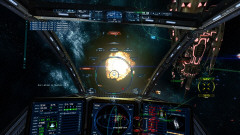
The game's display systems have been designed with gunsight focused information presentation in true combat fighter aircraft fashion, including the current target indicator which provides details to the player without them having to look away at a separate display. As much information as feasible is displayed on the central HUD gunsight and directly on the target being tracked. The reason this is done is basically the same as it is for modern jet fighters, keeping the pilot's visual focus in the smallest region possible for the most efficient rate of gathering and processing information.None of the primary target's shield array, threat level, hull damage, or overall velocity information requires the player to look away at the side of the screen, in a corner, or on a separate display. Likewise with much of the player's ship status information. This is one of the design goals of Evochron's combat display systems. In any combat gameplay scenario where the focus is putting a target near the middle of the screen for attacks, it's important to never force the player to have to look away from that focal point to retrieve important information about their flight conditions and ship/weapon status.
9 - Interactive Universe
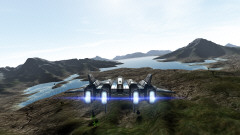
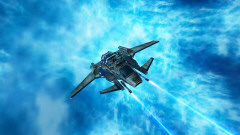
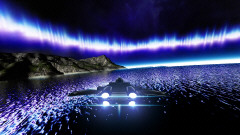
The game's design also sets out to provide realistic environment interaction far beyond the genre's typical 'background wallpaper' or 'view only' approaches. Nebula clouds, asteroid fields, planet atmospheres, moons, and more all provide unique options for shelter and strategy. Such environment elements include changes in gravity, fuel consumption, physics, sensor range, and visibility. When you see a planet come into view, it's an object you can access and land on, rather than just being a wallpaper image or a giant 'space mine' that destroys you if you dare get to close. If the basic idea of travelling to a distant world by flying there manually in a ship that you have selected and configured, descending into its atmosphere, then watching a sunrise on its surface does not appeal to you, then this may not be the game for you.Reachable objects in the game's universe are also available without interrupting cut scene transitions or separate 'sharded' modes within the game's universe. In multiplayer for example, players remain in the same consistent universe whether they are on a planet, in a nebula cloud, in a gas giant, near a star, in an asteroid cave, or in open space. This means players can chase each other or be chased by AI ships consistently when going from open space to a planet and vice versa in the game's universe.