


*** This is not a navigation tutorial.***
I have seen several topics in this section of the forums asking questions about the Science Officer and locating containers.
To get started, you must first hire yourself a Science Officer. They can be found at just about any station, but because crew are always traveling you may need to check a few different places. It is desirable that their skill level be 100 (higher skill means more accurate information) but it is ok to settle for less as their skills will improve over time.
As you travel from sector to sector, your Science Officer scans for items of interest. When he finds something you will receive a text notification in the text/chat box on the left of your screen. This will happen when you cross over the sector border or at the completion of a jump into a new sector. If you think you missed a message, don't worry, he will repeat it every time you enter that sector.
Most of the time he will be informing you about possible resources in asteroid fields or on planets in the sector. Occasionally, he will tell you about hidden containers. These containers could be inside of other objects or simply floating in empty space. He won't give you coordinates as with other objects, only a heading.
In order to find it, we must first understand the boundaries of our search area.
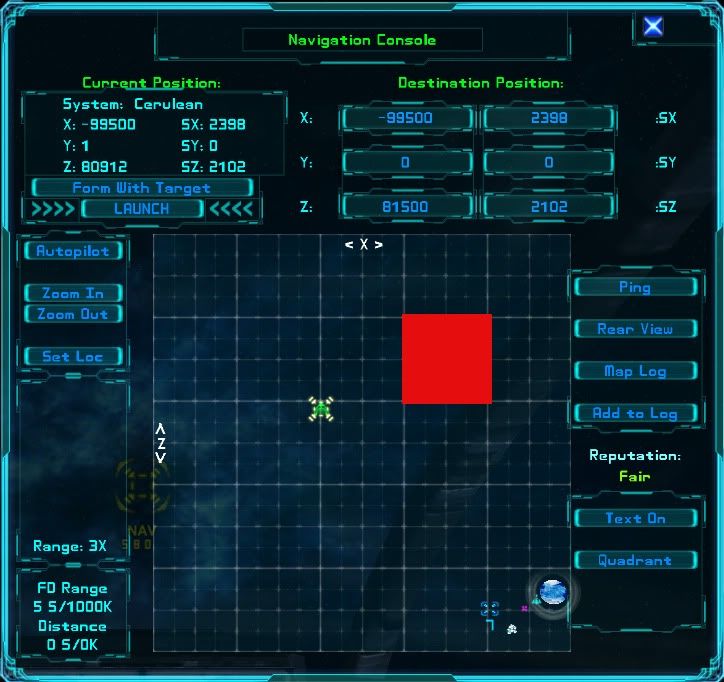
The red square represents a sector (technically a sub-sector of the system you are in). As you will notice by looking at the sectors around it, the boundaries are clearly marked by bolder lines on the map. So now we know just how far we can go in search of our treasure before we've gone too far. Don't forget, this space is cubic so we must also search along the Y axis.
So we have our search area defined, but that's a pretty big chunk of space. How can we find anything, especially a tiny container? Luckily, our Science Officer has given us some clues. He gives us a compass heading and a pitch setting.
This is usually where newcomers get into trouble so let's have a look:
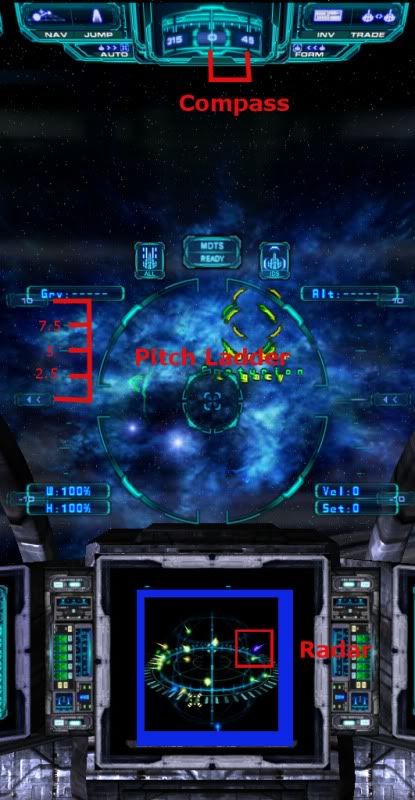
Let's start with the compass. The first thing you will notice is that it is numbered in increments of 45 degrees. The numbers are easy to read and the lines on the compass are clear. The lines though are not spaced in an easy to use way. We are accustomed to compasses, rulers and other instruments of measurement being marked in one, five, or ten unit measurements. It is still accurate if we know how to read it.
There are 14 lines between the numbered markers. We know that each numbered marker represents 45 degrees, therefor each of the lines represents 3.21 degrees. So now that we know how to accurately read the compass we can use it to set our heading.
Next we need to set our pitch if we are to have any hope of finding anything. Without a proper pitch setting you will pass over or under the item you are looking for. The pitch ladder is easy to read, it is numbered by the tens and as I've illustrated above is divided into increments of 2.5 degrees.
Now that we are able to accurately set our heading and pitch we can discuss different methods for searching.
The straight forward approach is to set our course and keep our eyes peeled. Scan the vast emptiness before you for any sign of an object. Also, keep an eye on your radar for that tell-tale purple "No ID" blip. Don't forget that depending on your approach vector they may be hidden in shadow.
Another, perhaps quicker method is to set your course and take note of the plotted vector, but instead of going forward, leave the sector and re-enter it at a different point, doing the same thing. By doing this you can observe where the different trajectories will cross the same point and that point will be very close to your target.
I hope that you find this tutorial informative and useful. Good hunting

From post: 97359, Topic: tid=6976, author=PandaBear wrote:Nice Tutorial!!!
I like to add help with pitch.
So you jump in a sector and Sci said heading ... Pitch -5
save you spot then jump out of the sector, select the spot you just save then turn you rear view and move up a bit from your save spot then jum back in
you will notice that the heading are the same, but the pitch had change. Repeat the step by eather move the mouse up or down till you get the pitch 0
From post: 97352, Topic: tid=6976, author=Marvin wrote:
[Edited on 12-2-2010 by AnFiach]From post: 97349, Topic: tid=6976, author=Eclipse wrote:Deploying sensor stations along the indicated heading can help in rapidly locating objects.





 :P:P:P:P..... 2 colors + 2 colors = the 5th color..